
Blog
AutoCAD vs Inventor: Which One Actually Fits Your Daily Work?

AutoCAD vs Inventor: Which One Actually Fits Your Daily Work?
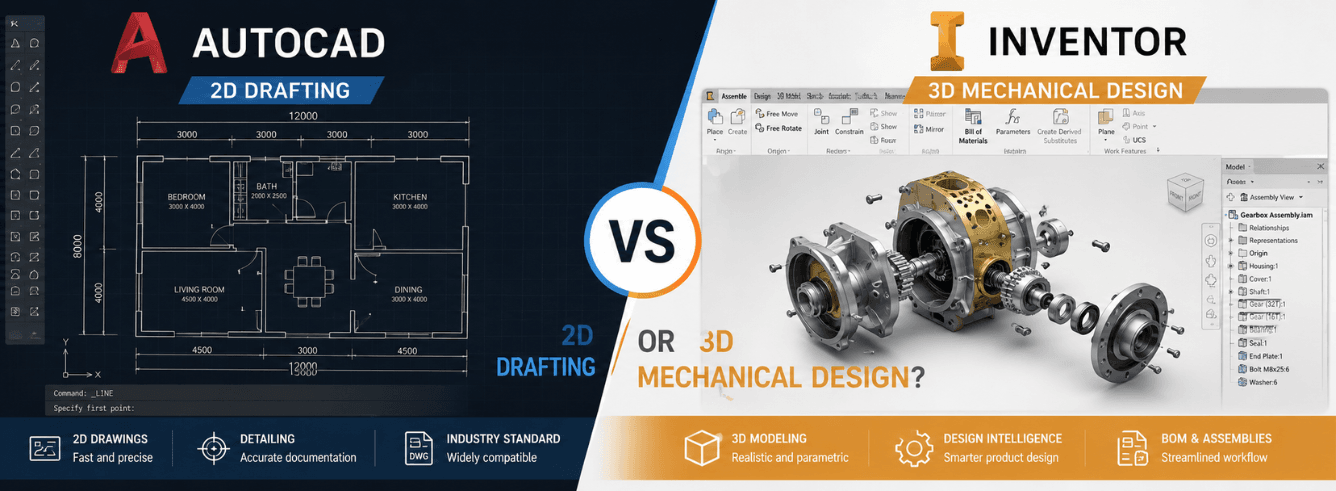
The AutoCAD vs Inventor question lands on every mechanical engineer’s desk sooner or later — one is the world’s most famous drafting tool, the other is a dedicated 3D product development platform, and Autodesk sells both. So why would anyone pick one over the other?
- AutoCAD and Inventor solve fundamentally different problems — they are not competitors within Autodesk’s own lineup.
- AutoCAD excels at 2D drafting, schematics, and projects where the drawing is the deliverable.
- Inventor is a parametric 3D solid modeler built for mechanical design, parts and assemblies, and downstream manufacturing.
- You can buy genuine licenses for both at significant savings — a year of either costs $59 at Zoftis versus $2,000+ direct from Autodesk.
- Many shops actually need both, and they interoperate well when you structure your workflow correctly.
Same company, two different philosophies
Autodesk didn’t build Inventor to replace AutoCAD. They built it to do something AutoCAD was never designed to do: manage parametric 3D product models from concept through manufacturing.
AutoCAD launched in 1982 as a general-purpose 2D drafting tool. Over four decades, it absorbed 3D capabilities, industry-specific toolsets, and cloud features — but its core identity never changed. You draw lines, arcs, and annotations on a canvas. Even when you extrude a shape into a 3D solid, AutoCAD treats it as geometry without a persistent design history.
Inventor arrived in 1999 with a completely different engine. Every feature you create — an extrusion, a hole, a fillet — lives in a timeline. Change a dimension at the top, and everything downstream recalculates. That single difference reshapes how you approach mechanical design, and it’s why comparing AutoCAD vs Inventor purely on feature lists misses the point.
AutoCAD includes the Mechanical toolset — a set of specialized commands for standard parts, layer management, and annotation designed for manufacturing drawings. It bridges some gaps but doesn’t turn AutoCAD into a parametric modeler. For more on specialized AutoCAD versions, see our AutoCAD LT guide.
The one difference that decides everything
If you take nothing else from this autodesk inventor vs autocad comparison, take this: design intent.
What design intent actually means
In AutoCAD, a hole is a circle on a layer. If you move the plate it belongs to, you move the circle manually — or you forget, and your drawing is wrong. In Inventor, a hole is a feature of a part. It knows which face it belongs to, what size it is, and whether it’s threaded or countersunk. If you resize the plate, the hole stays correctly positioned because it’s constrained to edges, not floating in space.
That is design intent. The model understands the rules you gave it. And it’s the foundational reason engineers choose Inventor for product development: the software enforces the logic, so you don’t have to remember it.
Where AutoCAD’s approach still wins
Not every project needs parametric 3D. When you’re laying out a factory floor, drawing P&ID schematics, or detailing a weldment that will never change, direct 2D drafting is faster. You sketch, dimension, plot, done. No feature tree to manage, no constraints to debug. For many engineers and designers, AutoCAD’s simplicity is the killer feature — especially when the deliverable is a PDF drawing, not a 3D model.
Feature-by-feature: where each tool wins
A straight comparison table cuts through the noise. Here’s how AutoCAD and Inventor stack up across the capabilities that matter in mechanical design.
| Capability | Inventor | AutoCAD |
|---|---|---|
| 2D drafting and annotation | Competent, DWG-compatible | Industry standard, unmatched speed |
| Parametric solid modeling | Full feature-tree, design history | Not available |
| Assembly constraints | Joints, limits, motion studies | Manual block arrangement only |
| Sheet metal design | Dedicated environment, flat patterns | Manual drafting only |
| Bill of materials (BOM) | Automatic, linked to model | Manual tables, no intelligence |
| Simulation and FEA | Built-in stress and modal analysis | Not available |
| Manufacturing drawings from 3D | Automatic view generation | Manual projection only |
| Schematic and layout drafting | Not designed for it | Excellent, with industry toolsets |
| Multi-discipline project coordination | Limited (part of PDMC collection) | Broad ecosystem, XREFs |
| Part library and content center | Extensive standard parts | Block libraries, less intelligent |
The pattern is clear: Inventor dominates every category tied to 3D product development. AutoCAD owns 2D drafting and multi-discipline coordination. Choosing between them isn’t about finding the better tool — it’s about defining your deliverable.
A day in the life: what you actually do in each program
Feature lists are abstract. Let’s ground this in what your Tuesday morning actually looks like in each tool.
In AutoCAD, you are drawing
You open a DWG, switch to a layout tab, and start placing views. You draw centerlines, add dimensions, and annotate tolerances. You might extrude a 3D solid to check a clearance, but you’ll probably dimension it in 2D on a layout. When the drawing is complete, you plot it to PDF and send it to the shop floor. The drawing is the product.
- Laying out plant equipment, P&IDs, and electrical schematics
- Creating manufacturing drawings where the 2D standard is the authority
- Editing legacy DWG files from clients, suppliers, or archived projects
- Producing permit and as-built documentation for civil and structural work
In Inventor, you are building
You start a part file, sketch a profile on a plane, and extrude it. You add holes, fillets, and shell the part. Then you drop it into an assembly, constrain it to other components, and check for interference. You generate a drawing view directly from the 3D model — any change to the model updates every view, every dimension, and the BOM automatically. The model is the product; the drawing is just a report from it.
- Designing machined parts, castings, and injection-molded components
- Building complex assemblies with hundreds of interrelated parts
- Running stress analysis on a bracket before sending it to the machine shop
- Outputting STEP or IGES files directly to CNC programming software
File formats and interoperability — what opens where
A practical headache in any inventor vs autocad decision is file compatibility. You don’t work in a vacuum — you get files from customers, send files to suppliers, and open legacy data from years ago.
| File type | Opens in AutoCAD | Opens in Inventor |
|---|---|---|
| DWG (AutoCAD native) | Native, full support | Opens, can reference for sketches |
| IPT/IAM (Inventor parts/assemblies) | No direct support | Native, full support |
| STEP/IGES (neutral 3D) | Limited (import as body) | Full import with feature recognition |
| STL (mesh) | Import and basic editing | Import, convert to solid, edit |
| PDF underlay | Attach and snap to geometry | Not designed for this workflow |
If your supply chain revolves around DWG files, AutoCAD remains the hub. If you receive STEP files from industrial designers or send IGES to CAM programmers, Inventor is the natural center.
Inventor can export DWG files that open cleanly in AutoCAD, including sheets with projected views. The reverse is harder — bringing a 2D AutoCAD drawing into Inventor as a parametric model requires manual reconstruction. Plan your workflow direction before committing.
What each one actually costs
Pricing is where the autocad vs inventor comparison gets interesting — because on paper they’re close, but what you pay depends entirely on where you buy.
| Purchase channel | AutoCAD (1 year) | Inventor Professional (1 year) |
|---|---|---|
| Autodesk.com (direct, single-user) | $2,030 | $2,410 |
| Zoftis (genuine subscription key) | $59 | $59 |
The Zoftis licenses are genuine Autodesk subscriptions — redeemed to your own Autodesk account, valid for version years 2024–2027, delivered by email within 1–12 hours, and backed by a 30-day money-back guarantee. At $59 each, the cost difference between the two programs vanishes, and many shops buy both for less than one month of direct pricing.
Autodesk also sells a Product Design & Manufacturing Collection that bundles Inventor Professional, AutoCAD, Fusion 360, and several other tools into one subscription. If you need multiple Autodesk products, check the collection pricing before buying individual seats. See our PDMC Collection page.
Switching from AutoCAD to Inventor: what changes
Plenty of engineers have spent a decade or more in AutoCAD and face the inventor or autocad question with genuine hesitation. The tools feel different. Here’s what actually changes when you make the switch.
What gets easier
- Design changes: modify one dimension, and the entire part — plus every assembly it lives in, plus every drawing that references it — updates automatically.
- Part libraries: Inventor’s Content Center includes standard fasteners, bearings, structural shapes, and shaft components that auto-size to your design.
- BOM management: the bill of materials is a live report from the assembly model, not a manually maintained table that drifts from reality.
- Interference checking: Inventor highlights clashes between components before anything goes to production.
- Simulation: basic stress analysis runs inside Inventor without exporting to another program.
What feels harder at first
- The sketch-constrain-extrude workflow requires upfront discipline — you can’t just draw lines and call it done.
- 2D drafting inside Inventor is capable but not as fluid as AutoCAD for pure drawing work.
- Opening and editing legacy DWG files is possible but not seamless — you’ll likely keep an AutoCAD seat for that.
Most engineers report a 2–4 week adjustment period, after which the parametric workflow becomes second nature. The bigger shift isn’t technical — it’s mental. You stop thinking about what to draw and start thinking about what to build.
When you need both (and when you don’t)
After reading this autocad vs autodesk inventor breakdown, you might suspect the answer for your shop is “both.” For many, that’s correct — and it’s not as expensive as it sounds at $59 per seat, per program from Zoftis.
Signs you only need AutoCAD
- Your deliverables are always 2D drawings — shop floor prints, schematics, site plans, permit documents.
- You primarily edit and maintain legacy DWG files from clients or archived projects.
- Your work spans multiple disciplines (mechanical, electrical, architectural) that converge in a single DWG.
- You never build assemblies with more than a handful of parts, and those parts rarely change.
Signs you only need Inventor
- You design products from scratch in 3D — machined components, weldments, molded parts, sheet metal enclosures.
- Your assemblies contain dozens to thousands of interrelated parts.
- You need BOMs that stay accurate when designs change.
- You output to CNC, 3D printing, or simulation software from your CAD model.
Signs you need both
- You design products in Inventor but receive supplier drawings in DWG format that need editing.
- Your shop floor runs on 2D prints, but your engineering team designs in 3D.
- You do equipment layout and plant design (AutoCAD’s strength) alongside machine design (Inventor’s strength).
- You collaborate with external teams who only use AutoCAD.
Get genuine Autodesk Inventor — $59 instead of $2,410
A full year of Inventor Professional, redeemed to your own Autodesk account. Delivered by email in 1–12 hours, backed by a 30-day money-back guarantee. Works with version years 2024–2027.
Buy Inventor Professional — $59Also available: AutoCAD — $59/year | PD&M Collection — $2,299
Frequently asked questions
Can AutoCAD open Inventor files directly?
No. AutoCAD cannot open native Inventor part (IPT) or assembly (IAM) files. However, Inventor can export models as AutoCAD DWG files, including 2D drawing views projected from the 3D model. Those DWGs open natively in AutoCAD. You can also export Inventor models as STEP or IGES files, which AutoCAD can import as 3D bodies — but without parametric intelligence.
Is Inventor harder to learn than AutoCAD?
Inventor has a steeper initial learning curve because it introduces parametric sketching, constraints, and feature-based modeling — concepts AutoCAD users don’t encounter in 2D drafting. However, most engineers find that once they internalize the parametric workflow (typically 2–4 weeks), Inventor becomes faster for product design because downstream changes propagate automatically. AutoCAD is easier to pick up on day one but requires more manual effort to maintain consistency across a complex project.
Does AutoCAD have any 3D solid modeling capabilities?
Yes. AutoCAD includes 3D solid, surface, and mesh modeling tools. You can extrude, revolve, sweep, and loft profiles into 3D geometry. However, AutoCAD uses direct modeling — there is no feature history or parametric relationship between elements. Change a face by moving it, and nothing else updates. This makes AutoCAD suitable for conceptual 3D work and simple part modeling, but impractical for complex mechanical design where design intent matters.
Can I use Inventor for 2D drafting without touching 3D?
Technically yes — Inventor includes a full set of 2D drawing tools in its sketch and drawing environments. But it’s the wrong tool for the job. Inventor’s 2D capabilities are designed to document 3D models, not to create standalone drawings from scratch. If your work is purely 2D drafting, AutoCAD (or AutoCAD LT) will be faster, more intuitive, and more compatible with industry workflows.
What’s the difference between Inventor Professional and Inventor LT?
Inventor LT is a lower-cost, stripped-down version. It includes part modeling, drawing creation, and basic assembly visualization — but it removes assembly modeling (you can view assemblies but not create them), sheet metal design, frame generation, simulation, and the Content Center. Inventor Professional (what Zoftis sells) includes everything: full assembly modeling, advanced simulation, sheet metal, frame design, cable and harness routing, and mold design tools. For any serious mechanical design work, Professional is the minimum viable option.
Is Fusion 360 a replacement for Inventor?
Fusion 360 and Inventor serve different audiences within Autodesk’s lineup. Fusion 360 is a cloud-native platform that combines CAD, CAM, CAE, and PCB design in one tool — it targets startups, hobbyists, and smaller teams who want an all-in-one solution. Inventor is a professional-grade parametric modeler built for large assemblies, complex sheet metal, and enterprise manufacturing workflows. They overlap in the middle, but most production engineering teams with formal release processes and large assembly requirements choose Inventor. For more on this comparison, see our Fusion 360 pricing page.