
Blog
Autodesk vs AutoCAD: Clearing Up a Common Confusion

Autodesk vs AutoCAD: Clearing Up a Common Confusion
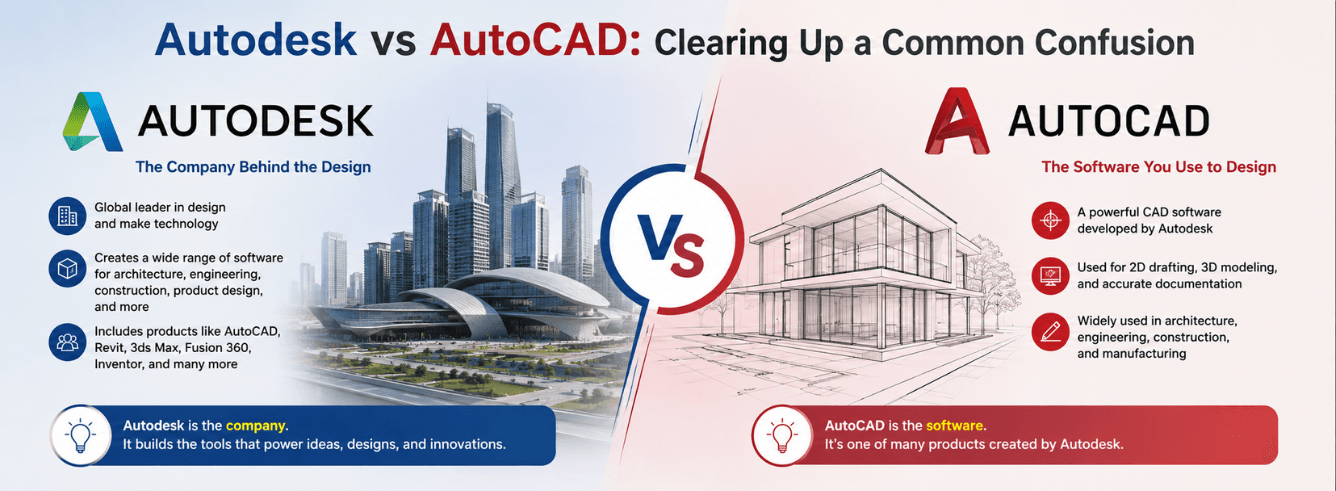
“Do I buy AutoCAD or Autodesk?” If you have ever asked that question, you are already deep in the autodesk vs autocad confusion that trips up thousands of buyers every month. One is a massive software company with over 80 products; the other is a single application — the one that started it all in 1982. Understanding the difference changes what you search for, what you buy, and how much you pay.
- Autodesk is the software company — a publicly traded giant (NASDAQ: ADSK) behind dozens of design and engineering tools.
- AutoCAD is one product — Autodesk’s flagship 2D/3D drafting application, first released in 1982.
- “AutoCAD” is not a category — it’s a trademarked product name, not a synonym for CAD software in general.
- The AutoCAD family has siblings — AutoCAD LT, AutoCAD for Mac, and the full AutoCAD with specialized toolsets are all different things.
- You might not even need AutoCAD — depending on your industry, Revit, Inventor, or Fusion 360 could be the right Autodesk product for you.
The simple family tree: who is who
Most people land on this page because they typed “autodesk vs autocad” into Google. Maybe a colleague said “we use AutoCAD,” another mentioned “Autodesk software,” and now nothing lines up. Let’s fix that in two sentences.
But the confusion is understandable, and it has a history. Autodesk was founded in 1982 by John Walker and a small team of programmers. Their first — and for years, only — product was AutoCAD. It became so dominant in the drafting world that people started calling any CAD file a “DWG” and any CAD work “AutoCAD.” The brand swallowed the category whole.
Today, Autodesk is a publicly traded company headquartered in San Francisco, reporting over $5.5 billion in annual revenue. It sells more than 80 different products across architecture, engineering, construction, manufacturing, and entertainment. AutoCAD is still its most famous child, but it is now just one seat at a very large table.
| What it is | Autodesk | AutoCAD |
|---|---|---|
| Type | Software company (NASDAQ: ADSK) | Single software product |
| Founded | 1982, by John Walker | Released December 1982 |
| Revenue | $5.5+ billion annually | One revenue stream among many |
| Products | 80+ software titles | 1 flagship application |
| You buy this | No — you buy individual products from them | Yes — as a named subscription |
So the next time someone says “we need to buy Autodesk,” what they almost certainly mean is “we need to buy one specific Autodesk product.” And that product might not even be AutoCAD.
What Autodesk actually makes — the full product portfolio
This is where the “brand vs product” question gets practical. Autodesk’s product family sprawls across industries. Knowing the landscape helps you confirm you are buying the right tool — and not assuming AutoCAD covers everything just because it’s the name you recognize.
The big picture: three industry collections
Autodesk bundles its products into three flagship industry collections. These are a smart way to get multiple titles for less than buying them individually — but only if you genuinely need the full suite. Each collection includes AutoCAD, plus the heavy-hitters for that field:
- AEC Collection (Architecture, Engineering & Construction): Revit, AutoCAD, Civil 3D, InfraWorks, Navisworks Manage, and more. Built for building and infrastructure professionals.
- Product Design & Manufacturing Collection: Inventor Professional, AutoCAD, Fusion 360, Navisworks Manage, and more. Built for mechanical engineers and product designers.
- Media & Entertainment Collection: Maya, 3ds Max, Arnold, MotionBuilder, and more. Built for 3D animators, VFX artists, and game developers.
If you work across disciplines — say, an architect who also handles structural detailing — an AEC Collection subscription often costs less than buying Revit and AutoCAD separately. Check the full software list before committing to single-product purchases.
Beyond the collections: standalone tools worth knowing
Autodesk also sells products that live outside the main collections or serve specialized audiences. These matter because a buyer who thinks “I need AutoCAD” might actually need one of these:
| Product | Best for | Note |
|---|---|---|
| Fusion 360 | Product designers, startups, hobbyists | Cloud-based CAD/CAM/CAE; overlaps with Inventor for lighter work |
| 3ds Max | Game artists, visualization pros | 3D modeling and rendering; often paired with V-Ray or Arnold |
| Maya | Film and TV animators | Industry-standard 3D animation; distinct from CAD drafting |
| Revit | Architects, MEP engineers | BIM (Building Information Modeling), not line-based drafting |
| Civil 3D | Civil engineers, surveyors | Built on AutoCAD but purpose-built for infrastructure |
Notice a pattern? Several of these include “AutoCAD” somewhere in their DNA — Civil 3D literally runs on top of it — but calling them “AutoCAD” would be wrong. The autodesk vs autocad distinction becomes the difference between buying the right software and wasting money on something that cannot do the job.
Inside the AutoCAD family: LT, Mac, Web, and full AutoCAD
Even once you know you need AutoCAD specifically, the decision isn’t over. The “AutoCAD family” has several members, and the autodesk autocad vs autocad confusion — people comparing different versions of the same product — is surprisingly common. Here is how they break down.
Full AutoCAD (Windows) — the one with everything
The flagship product. Full AutoCAD includes 2D drafting, 3D modeling, rendering, AutoLISP and .NET customization, and — critically — access to seven specialized toolsets. These toolsets (Architecture, Mechanical, Electrical, MEP, Plant 3D, Map 3D, and Raster Design) used to be sold as separate products. Since 2019, they are included with every full AutoCAD subscription at no extra cost.
If you draw floor plans, the Architecture toolset gives you walls, doors, and windows that behave like real building objects instead of raw lines. If you design machinery, the Mechanical toolset adds standard parts libraries and automated layer management. The value is real, and it is the main reason to choose full AutoCAD over LT.
AutoCAD LT — 2D drafting, stripped down
AutoCAD LT is the lighter, more affordable sibling. It handles 2D drafting with near-identical core tools, but drops 3D modeling entirely. No solid, surface, or mesh tools. No programming interfaces (no AutoLISP, no .NET). No specialized toolsets. No access to the AutoCAD Mobile or Web apps with full editing capabilities.
LT is ideal for pure 2D documentation work. If you receive 3D models from colleagues and only need to annotate them, LT may suffice. But if you plan to do any 3D work — or rely on custom LISP routines — starting with LT and upgrading later means a steeper switch than choosing full AutoCAD from day one.
AutoCAD for Mac — the native macOS build
This is a genuine, native Mac application — not a Windows port wrapped in an emulator. It includes 2D and 3D tools, runs on Apple Silicon natively, and shares the DWG file format with the Windows version. However, it lacks the specialized toolsets and has a slightly different interface and feature set. It is a good fit for Mac-only teams who need real AutoCAD, not a workaround.
AutoCAD Web and Mobile — lightweight access
These are browser-based and mobile-app versions included with a full AutoCAD subscription. They let you view, edit, and share DWG files from anywhere, but they are supplements — not replacements — for the desktop product.
| Feature | AutoCAD (full) | AutoCAD LT |
|---|---|---|
| 2D drafting | Full set | Full set |
| 3D modeling | Solids, surfaces, meshes | None |
| Specialized toolsets | 7 included (Architecture, Mechanical, etc.) | None |
| AutoLISP / APIs | Full programming support | Not available |
| AutoCAD Web/Mobile | Full access included | Limited web access only |
| Windows & Mac | Windows only; Mac sold separately | Windows and Mac versions available |
AutoCAD vs CAD: the trademark vs the category
Here is another layer of the autodesk vs autocad puzzle: people frequently use “AutoCAD” when they mean “CAD” in general. This is like calling every tissue a Kleenex or every search engine Google. It’s a testament to AutoCAD’s dominance, but it creates genuine confusion when it is time to buy.
CAD — Computer-Aided Design — dates back to the 1950s. Dr. Patrick Hanratty, often called the father of CAD, developed early numerical control systems that evolved into the first interactive drafting tools. By the time Autodesk launched AutoCAD in 1982, CAD had already existed for two decades on mainframe computers. What Autodesk did was bring it to the PC — and at a price small firms could afford.
Today, “CAD” is the category. AutoCAD is one product inside it. Other CAD programs include:
- SolidWorks — Dassault Systèmes’ mechanical CAD package (a direct Inventor competitor, not an AutoCAD competitor in most workflows).
- MicroStation — Bentley Systems’ CAD platform, common in civil infrastructure and government projects.
- SketchUp — Trimble’s 3D modeling tool, popular in architecture and interior design for conceptual work.
- BricsCAD — A DWG-compatible alternative that reads and writes AutoCAD files natively.
- FreeCAD, LibreCAD — Open-source CAD tools, limited but zero-cost.
When someone says “send me the CAD file,” they almost always mean a DWG file — the format AutoCAD made the standard. But DWG files can now be created and edited by many programs. Owning AutoCAD is not the only way to work with DWGs. It is, however, the most fully compatible, feature-complete, and industry-expected way.
The cad vs autocad question matters most when you are pricing software. A CAD program can be free, cheap, or expensive. “AutoCAD” is a specific commercial product with a known subscription cost. Conflating the two leads to inaccurate budget expectations.
Which one do you actually need? Three buyer scenarios
All of the above leads to one practical question: what do you type into the search bar when you are ready to buy? Here are three realistic starting points, and where each one should lead you.
Scenario 1: “I do 2D drafting for a small architecture or engineering firm”
You draw plans, sections, and elevations. You do not build 3D models. You open DWG files from clients, make markups, and send them back. You have never written a line of AutoLISP.
What you likely need: AutoCAD LT. It handles pure 2D work at a lower price point. But — and this is the honest catch — make sure your workflow genuinely never touches 3D. If a client sends you a 3D DWG and asks for a view extraction, LT cannot help.
Scenario 2: “I need full AutoCAD — drafting, 3D, and customization”
You work across 2D and 3D. You use specialized toolsets for your industry. You or your team run custom LISP routines, scripts, or plug-ins. You need the full product, not a stripped-down version.
What you need: Autodesk AutoCAD (full, Windows). This is the product that gives you every feature Autodesk builds into its flagship drafting application. At Zoftis, a genuine 1-year subscription starts at $59 — significantly below what you would pay directly from Autodesk’s store — delivered to your own Autodesk account with a 30-day money-back guarantee.
Get genuine AutoCAD at 40% below retail
A full 12-month subscription, activated on your own Autodesk account. Delivered by email in 1–12 hours, backed by a 30-day money-back guarantee. No gray-market keys — genuine commercial license.
Buy AutoCAD — $59/year →Also available: AutoCAD LT from $399/year
Scenario 3: “I do not actually need AutoCAD — I need Revit, Inventor, or Fusion 360”
You are an architect designing a building from the ground up, including BIM data. Or a mechanical engineer designing assemblies with moving parts. Or a product startup iterating on a consumer device. AutoCAD might feel familiar, but it is the wrong tool for these jobs.
What you likely need:
- Revit — if you work in architecture, structural engineering, or MEP and need BIM coordination. Revit models are intelligent; AutoCAD lines are not.
- Inventor Professional — if you design mechanical parts, assemblies, and need parametric modeling with simulation. Inventor thinks in features and constraints, not lines and arcs.
- Fusion 360 — if you need CAD, CAM, and CAE in one cloud-connected package, especially for small-team or startup environments.
In every case, you are still buying from Autodesk. But you are not buying AutoCAD. And that distinction — the whole point of this autodesk vs autocad guide — saves you from purchasing the wrong subscription and having to explain the mistake later.
AutoCAD is the tool the world knows. But it is not always the tool the job demands.
Frequently asked questions
Is Autodesk the same as AutoCAD?
No. Autodesk is the software company that develops and sells AutoCAD, along with 80+ other products including Revit, Inventor, Maya, and Fusion 360. AutoCAD is a single drafting application within Autodesk’s product portfolio. The relationship is the same as Adobe and Photoshop, or Microsoft and Excel.
Why do people say “AutoCAD” when they mean any CAD software?
AutoCAD was one of the first CAD programs available on personal computers and became the dominant platform for DWG-based drafting. Over decades, its brand name became a genericized term — similar to “Kleenex” for tissues or “Xerox” for photocopying. In professional settings, however, the distinction matters: a DWG file can be created in many CAD programs, not just AutoCAD.
Can I buy “Autodesk” as a single product?
No. Autodesk does not sell “Autodesk” as a product. You subscribe to individual titles like AutoCAD, Revit, or 3ds Max, or you subscribe to an Industry Collection that bundles several products together. Each subscription is tied to a named user and managed through an Autodesk account.
What is the difference between AutoCAD and AutoCAD LT?
AutoCAD LT is the 2D-only, lower-cost version of AutoCAD. It lacks 3D modeling tools, specialized industry toolsets (Architecture, Mechanical, Electrical, etc.), and support for programming interfaces like AutoLISP. It is ideal for pure drafting work. Full AutoCAD includes everything: 2D, 3D, toolsets, and full customization.
Is AutoCAD the same as CAD?
No. CAD (Computer-Aided Design) is a broad category of software that has existed since the 1950s. AutoCAD is one specific product within that category — the most widely used, but not the only one. Other CAD programs include SolidWorks, MicroStation, BricsCAD, and many more.
Do I need AutoCAD if I already use Revit?
Not necessarily, but many firms run both. Revit handles BIM modeling, coordination, and documentation. AutoCAD often handles 2D detailing, legacy projects, or consultant drawings that arrive as DWG files. The AEC Collection bundles both, which can be more cost-effective than buying them separately if you need both.