
Blog
Can You Run Fusion 360 on a Chromebook, iPad or Linux?

Can You Run Fusion 360 on a Chromebook, iPad, or Linux? (2026)
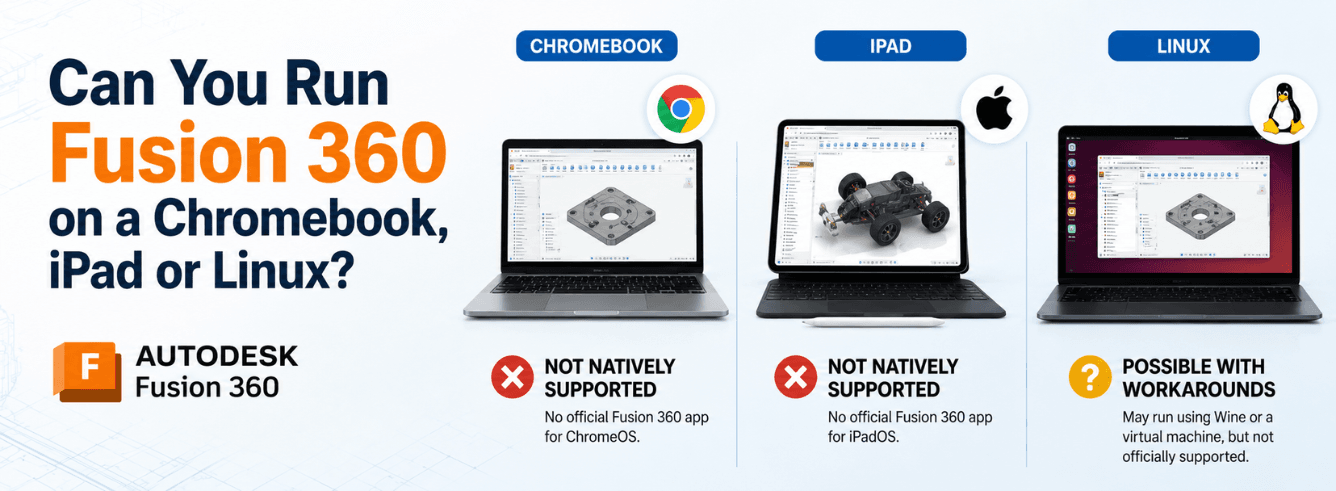
If you’re searching for fusion 360 for chromebook, iPad, or Linux, you’ve probably hit a wall: Autodesk officially supports only Windows and macOS. But that doesn’t mean you can’t run Fusion 360 on other platforms — you just need to know which workarounds actually work and which are dead ends. This guide cuts through the noise.
- Chromebook: Educational accounts can access Fusion 360 through a browser — but it’s a limited, education-only offering.
- iPad: The official Fusion app is for viewing and markup only. You cannot create or edit models.
- Linux: Community installers exist but are fragile and unsupported. Cloud-hosted Windows workstations are more reliable.
- Browser editing is gone: As of September 2020, Autodesk removed the “Edit in Browser” preview. Don’t fall for outdated advice.
Chromebook: The education-only web route
If you’re looking for fusion 360 for chromebook, the official answer exists — but with a major catch: it’s only for educational users. In 2024, Autodesk made Fusion 360 available to students and educators on Chromebooks through a web-based interface [citation:7].
How to access Fusion 360 on a Chromebook
- Eligibility: You must have a qualifying educational account through Autodesk’s Education Community.
- Access point: Visit
fusion.online.autodesk.comand log in with your educational credentials [citation:7]. - What you get: It’s the “full version” of Fusion 360 for CAD and CAM, but with some local-installation features disabled (e.g., certain sharing options, log collection) [citation:7].
Note: When you complete the educational sign-up, Autodesk automatically triggers a desktop download — you can close that browser window. The Chromebook version is web-based and doesn’t require installation [citation:7].
For non-students? There’s no official Chromebook support. Your only options are cloud workstations or virtualized Windows desktops — more on those below.
“Autodesk Fusion is now available on Chromebooks for students.” — Autodesk official announcement [citation:7]
iPad: Viewer only — no editing, no exceptions
The fusion 360 for ipad question comes up constantly. And the answer hasn’t changed: the official Fusion app for iPad (and iPhone) is a viewer and collaboration tool, not a design tool [citation:2][citation:8].
What the iPad app actually does
- View: Open and navigate 3D models with touch controls (zoom, pan, rotate). Supports over 100 file formats [citation:2].
- Comment: Add markups, annotations, and comments for team collaboration.
- Share: Share screenshots and project status with stakeholders.
- Measure: Take measurements on the go — handy for field or client work [citation:8].
Critical limitation: You cannot create, edit, or modify models on the iPad app. It’s a companion tool, not a replacement for the desktop client [citation:14].
One user review on the App Store put it plainly: “the iOS app being a simple viewer only, where you can make markups in pen, but can’t edit the design fully” [citation:2]. Another called it “a disappointment” for creative work on an iPad Pro [citation:8].
If you need to actually design on an iPad, you’re out of luck. You’ll need to remote into a Windows or Mac machine running the full desktop client.
Linux: Wine scripts and cloud workstations
There’s no fusion 360 ubuntu native build, nor any official fusion 360 on ubuntu support from Autodesk [citation:6][citation:15]. But the Linux community keeps trying to make it work anyway.
Community Wine installers (fragile, unsupported)
Projects like cryinkfly’s “Autodesk-Fusion-360-for-Linux” attempted to package Fusion 360 with Wine and DXVK to run on Linux. The repository was archived by its owner in February 2026 [citation:9]. Community patches still emerge — one recent Wine patch fixed glitchy browser panels on KDE Plasma [citation:3] — but this is a constant game of whack-a-mole.
Warning: Wine-based installers are not supported by Autodesk. They can break with any Fusion update, offer no performance guarantees, and may not handle large assemblies or CAM toolpath generation. Some reports also indicate file deletion risks [citation:9].
The more reliable Linux option: cloud-hosted Windows
If you’re on Linux and need Fusion 360 for real work, the best bet is a cloud workstation or virtualized Windows desktop. Services like Apps4Rent offer hosted Fusion 360 environments starting at around $99/month — you access a Windows desktop from your Linux machine and run the native Windows version of Fusion 360 [citation:5].
It’s not free, but it works and includes GPU acceleration, backups, and enterprise-grade security.
Why the “browser” hope died
You might have seen older articles talking about “Edit in Browser” for Fusion 360. That option is no longer available [citation:4].
Autodesk officially discontinued the browser editing preview on September 1, 2020. It was never moved to full production [citation:4][citation:10]. Designs created in that preview can still be edited — but only through the full desktop client, not through a browser.
Bottom line: There’s no general-purpose browser-based Fusion 360 editor anymore. The education-only Chromebook web version is the sole browser exception — and it’s locked to academic users.
Any article telling you you can “edit Fusion 360 in a browser” without mentioning the education restriction or the September 2020 date is misleading.
The cloud workstation option (paid but solid)
If you’re on Chromebook, iPad, or Linux — or even if your local Windows machine is underpowered — cloud-hosted Windows desktops are the most reliable non-Windows solution [citation:5].
How it works
- A cloud provider runs a Windows virtual machine with certified graphics hardware.
- You connect from any device with a browser or remote desktop client.
- You install the native Windows version of Fusion 360 on that virtual machine.
- Performance is determined by the cloud VM specs, not your local device.
Typical offering
Providers like Apps4Rent offer Fusion 360 cloud hosting from around $99/month with dedicated vCPU, GPU acceleration, 15‑day backups, and 99.9% uptime guarantees [citation:5].
Tip for Linux users: This is the only production-safe way to run Fusion 360 on Linux without dual-booting. It’s also a great way to get a certified GPU and high RAM without upgrading your local hardware.
Comparison: Fusion 360 across every platform
| Platform | Our recommendation | Other options |
|---|---|---|
| Chromebook | Educational web version (fusion.online.autodesk.com) — free for students | Cloud workstation (paid) |
| iPad | Use the official app for viewing/markup only | Remote desktop to a Windows/Mac machine |
| Linux | Cloud-hosted Windows workstation — reliable and supported | Community Wine scripts (fragile, unsupported) |
| Windows (native) | Full performance, all features, official support — gold standard | — |
| macOS (native) | Apple Silicon native, official support | — |
As of 2026, Windows and macOS are the only platforms where Fusion 360 runs natively with full official support [citation:6]. Everything else is a workaround with trade-offs.
Who actually needs the desktop version?
If you’re doing professional CAD, CAM, simulation, or electronics design, you need the full desktop client. Here’s why:
- Performance: Complex assemblies, CAM toolpath generation, and simulations require CPU/GPU power that browser or mobile apps can’t match. Autodesk recommends 32GB+ RAM and certified graphics for professional usage [citation:6].
- All features: tSplines, 3D sketching, assemblies, surface modeling, sheet metal, electronics, simulation, and CAM are only in the desktop client [citation:4].
- Offline mode: Cloud versions need internet. The desktop client works offline (with occasional check-ins).
- Stability: Community workarounds break. Cloud workstations add latency. The native desktop just works.
Get the genuine Fusion 360 for Windows — from $59/year
Our Autodesk Fusion 360 for Windows license gives you full CAD, CAM, CAE, and PCB tools. Delivered by email within 1–12 hours, with a 30‑day money‑back guarantee.
View Fusion 360 for Windows →Also available: Fusion 360 Commercial License for professional use
If you’re a student, the educational Chromebook route works. If you’re a hobbyist, cloud workstations or community Wine scripts might get you by. But if you’re earning money with Fusion 360, the Windows native version is the only sensible choice.
Frequently asked questions
Can I run Fusion 360 on a Chromebook without an educational account?
No. The official Chromebook access via fusion.online.autodesk.com is restricted to students and educators with a verified educational account [citation:7]. Without that, you’ll need a cloud-hosted Windows desktop.
Does the iPad app let me edit Fusion 360 models?
No. The official Fusion app for iPad and iPhone is a viewer only. You can view, measure, comment, and share — but you cannot create or edit designs [citation:2][citation:14].
Is there a native Linux version of Fusion 360?
No. Autodesk does not provide a native Linux build. The official system requirements list only Windows and macOS [citation:6][citation:15].
Can I use Fusion 360 in a browser?
Not for editing. The “Edit in Browser” preview was discontinued on September 1, 2020 [citation:4]. The only current browser access is the education-only Chromebook version — and that’s a separate offering, not the full editor.
What’s the cheapest way to run Fusion 360 on Linux?
Free: try the community Wine installers (but expect breakage). More reliable: use a cloud-hosted Windows desktop — plans start around $99/month [citation:5]. Or dual-boot Windows.