
Blog
Blender vs Fusion 360: Product Design or 3D Art?

Blender vs Fusion 360: Which One Should You Learn First in 2026?
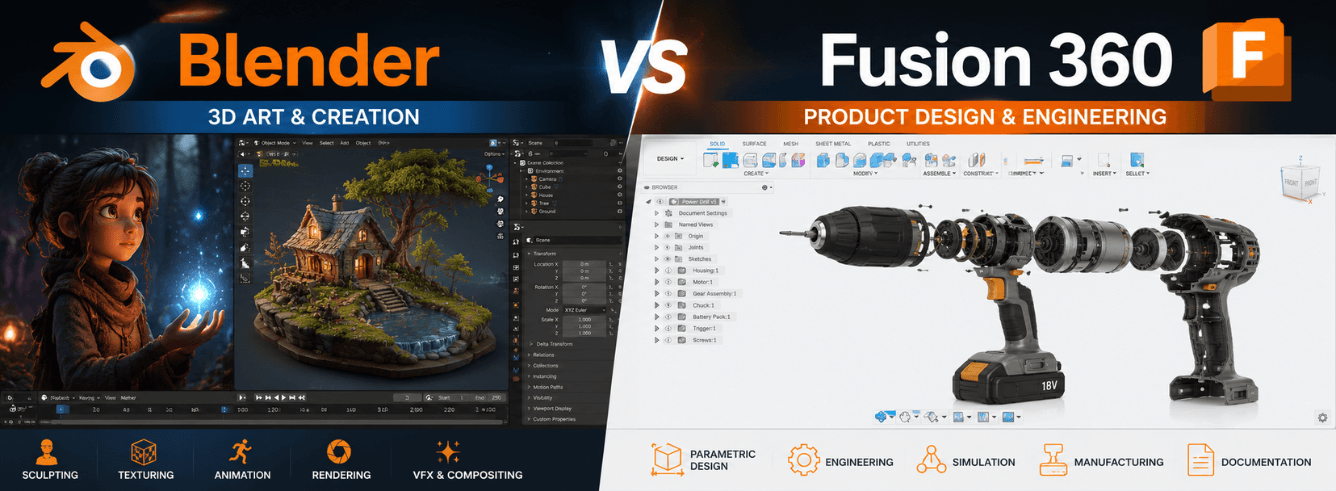
The Blender vs Fusion 360 debate isn’t about which software is “better” — it’s about which one fits what you actually want to make. One is a free-for-life Swiss Army knife for digital art; the other is a precision engineering tool that can send a part to a CNC machine. Let’s break down the real difference so you pick the right one from day one.
- Blender is entirely free (GPL license) with no feature limits — use it commercially at no cost .
- Fusion 360 has a free personal license for non-commercial hobby use, but commercial use requires a paid subscription .
- Blender uses polygon mesh modeling — ideal for organic shapes, characters, and artistic work .
- Fusion 360 uses parametric solid modeling — perfect for engineering, manufacturing, and dimension-driven design .
- Many professionals use both — Fusion 360 for functional structure and Blender for detailed organic elements .
Why This Comparison Matters
The Blender vs Fusion 360 confusion is understandable. Both are powerful 3D tools available for free (or nearly free). Both can produce STL files for 3D printing. Both run on Windows and Mac.
But they come from completely different worlds. Blender emerged from the animation and visual effects industry. Fusion 360 was built by Autodesk for product design, mechanical engineering, and manufacturing.
The result? Two tools that approach 3D modeling with entirely different philosophies. Choosing the wrong one can mean weeks of learning curves in the wrong direction .
| Your goal | Likely choice | Why |
|---|---|---|
| 3D print functional parts (brackets, gears, enclosures) | Fusion 360 | Parametric modeling ensures everything fits |
| Sculpt characters, miniatures, or jewelry | Blender | Digital clay approach is unmatched for organics |
| Create animations or game assets | Blender | Full animation pipeline built in |
| Design products for manufacturing | Fusion 360 | Built-in CAM and manufacturing tolerances |
| Learn 3D modeling on a zero budget | Either | Both offer free plans for learners |
Blender: The Free All-Rounder
Blender is the ultimate zero-budget powerhouse. It’s open-source (GPL license), completely free — no subscriptions, no feature limits, no commercial-use restrictions .
Key fact: Blender is fully free, including for commercial projects. No catch. It’s funded by donations and corporate sponsors, not by charging users .
What Blender Does Best
- Polygon mesh modeling — you work with vertices, edges, and faces to build shapes from the ground up
- Sculpting — like digital clay, with brushes that push, pull, and smooth geometry
- Animation — full rigging, keyframing, and timeline tools
- Rendering — two built-in render engines (EEVEE for real-time, Cycles for photorealistic ray tracing)
- VFX and compositing — motion tracking and post-processing built in
- Massive plugin ecosystem — community add-ons for everything from CAD-like modeling to 3D print preparation
Where Blender Falls Short
- No parametric modeling — change a dimension and you’ll have to manually update everything that depends on it
- Not CAD-precise — Blender’s polygon mesh approach lacks the dimensional accuracy engineers need
- Steep learning curve — the interface relies heavily on keyboard shortcuts and can feel overwhelming at first
- Not industry standard in film — major studios still use Maya and Houdini for production pipelines
Blender is the best free 3D app for most users, with the largest tutorial library and a full feature set covering modeling, sculpting, animation, and rendering .
Fusion 360: The Engineer’s Choice
Fusion 360 is Autodesk’s cloud-based CAD, CAM, and CAE platform. It’s what engineers, product designers, and manufacturers use when parts have to work — fit together, move correctly, and survive real-world physics .
Honest note: Fusion 360 has a free Personal license for non-commercial hobby use. It includes core CAD tools with limits (10 active documents, restricted CAM). For commercial use, you’ll need a paid subscription .
What Fusion 360 Does Best
- Parametric solid modeling — sketch a 2D profile, extrude it to 3D, and every dimension is a variable you can change later
- Design history timeline — go back to any step in your modeling process and change it; everything downstream updates automatically
- Built-in CAM — generate toolpaths for CNC machining directly from your design
- Simulation — test stress, thermal performance, and motion before you manufacture
- Cloud collaboration — share designs and work with teams remotely
- Direct modeling — push, pull, and tweak geometry without worrying about the parametric history
Where Fusion 360 Falls Short
- Cloud dependency — you need internet access for full functionality
- Not for organic shapes — Fusion 360 can’t sculpt characters or detailed figurines the way Blender can
- No animation tools — if you need rigging or keyframe animation, look elsewhere
- Free version has limits — the Personal plan restricts exports, CAM features, and active document count
Fusion 360 is the best choice for CAD, engineering, and 3D printing functional parts. It’s the go-to for parts that must fit, align, or move .
Blender vs Fusion 360: Head-to-Head Comparison
| Feature | Blender | Fusion 360 |
|---|---|---|
| Price | Free (always, including commercial) | Free Personal / $680/year commercial |
| Modeling approach | Polygon mesh (vertices + faces) | Parametric solid (dimension-driven) |
| Best for | Organic shapes, characters, animation, art | Functional parts, engineering, manufacturing |
| Learning curve | Steep, shortcut-heavy interface | Moderate, more structured workflow |
| Precision | Approximate (visual) | Dimensional accuracy to fractions of a millimeter |
| Animation | Full animation pipeline | None |
| CAM/Manufacturing | Limited (community plugins) | Built-in professional CAM |
| Simulation | Limited physics (cloth, fluids) | Stress, thermal, motion analysis |
| Cloud features | None | Cloud storage and collaboration |
| Platforms | Windows, Mac, Linux | Windows, Mac |
Watch out: Fusion 360’s free Personal license is not for commercial work. If you plan to sell what you make, check the current terms before starting a business .
Which Should You Choose?
Choose Blender if…
- You want to create 3D art, characters, or visual effects
- You’re interested in animation or game development
- You need a completely free tool with no commercial restrictions
- You’re sculpting organic shapes like miniatures, figurines, or jewelry
- You want the largest tutorial library of any 3D software
Choose Fusion 360 if…
- You’re designing functional parts that must fit together precisely
- You plan to manufacture your designs (3D print, CNC, injection molding)
- You need parametric modeling with a design history
- You’re an engineer, product designer, or maker who builds mechanical things
- You want integrated simulation and manufacturing tools
Can You Use Both?
Absolutely — and many professionals do. Here’s a common workflow:
- Fusion 360 for the functional structure: the bracket, housing, or mechanical core that needs precise dimensions
- Blender for the organic details: the sculpted handle, decorative elements, or character features that need artistic freedom
Pro tip: Design the mechanical core in Fusion 360, export as STL or OBJ, and bring it into Blender for sculpted details. Both export formats that the other can read.
Frequently Asked Questions
Is Blender better than Fusion 360?
Neither is “better” — they serve different purposes. Blender is better for organic modeling, animation, and art. Fusion 360 is better for precise engineering, product design, and manufacturing. Choose based on what you’re making .
Is Fusion 360 still free?
Yes, Fusion 360 offers a free Personal license for non-commercial hobby use. It includes core CAD tools with some limits (10 active documents, restricted CAM). Students and educators get a free 3-year educational license with full features. Commercial use requires a paid subscription starting at $680/year .
Can you use Blender for 3D printing?
Yes, Blender can export STL files for 3D printing. It’s excellent for artistic models like miniatures, figurines, and jewelry. However, for functional parts that need precise dimensions, Fusion 360 or other CAD software is usually the better choice .
Which is easier to learn: Blender or Fusion 360?
It depends on your background. Blender has a steeper initial learning curve due to its shortcut-heavy interface, but has the largest tutorial library of any 3D software. Fusion 360 has a more structured, professional workflow that some find more intuitive if they have engineering or CAD experience .
Can I use Blender commercially?
Yes — Blender is open-source under the GPL license and completely free for commercial use. No subscription, no license fees, no restrictions .
Ready to start with Fusion 360?
Get a genuine Autodesk Fusion 360 subscription for Windows — CAD, CAM, CAE, and PCB all in one. From $59/year with 1–12 hours delivery and a 30-day money-back guarantee.
View Fusion 360 Pricing →Also available for Mac with native Apple Silicon support