
Blog
AutoCAD vs Fusion 360: Which CAD Tool Fits Your Workflow?

AutoCAD vs Fusion 360: Which CAD Tool Fits Your Workflow?
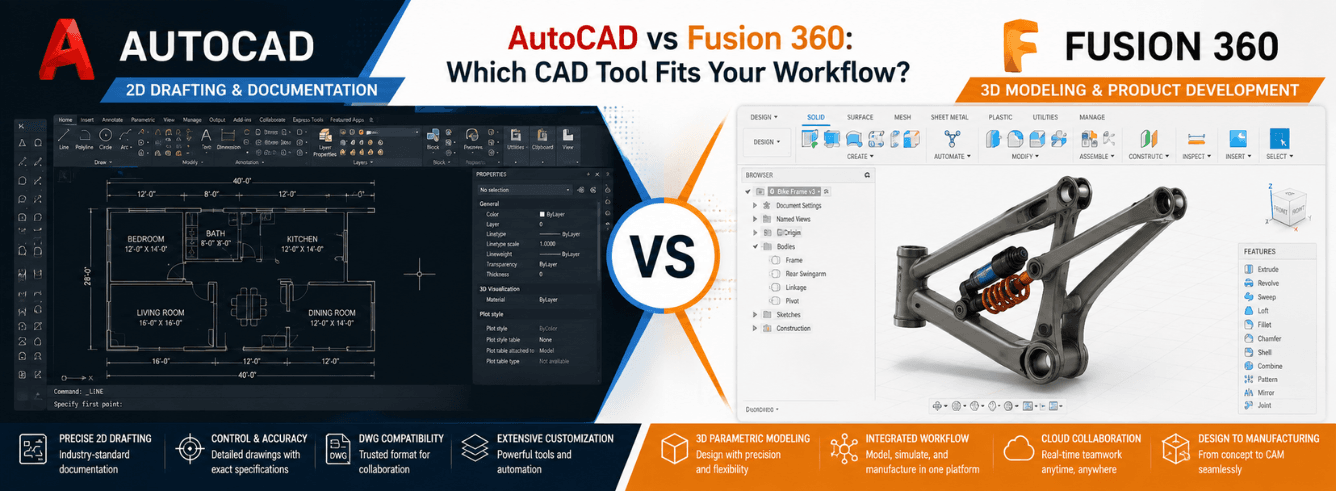
The autocad vs fusion 360 debate isn’t about which program is better — it’s about which one matches how you actually work. AutoCAD remains the precision scalpel for 2D documentation and drafting professionals, while Fusion 360 is the cloud-connected Swiss Army knife for product designers who need integrated CAM, simulation, and collaboration baked in from day one.
- AutoCAD excels at precise 2D drafting with 7 specialized toolsets — it’s the industry standard for architects, civil engineers, and construction pros.
- Fusion 360 bundles CAD, CAM, CAE, and PCB design into one subscription — built for product designers who take concepts from sketch to manufactured part.
- Fusion 360 is cloud-native with real-time collaboration; AutoCAD works locally with optional cloud connectivity.
- AutoCAD’s 2D-to-3D transition is clunky and bolt-on; Fusion 360’s parametric timeline makes design changes painless.
- You can get genuine Autodesk licenses for both at 40–70% below retail through Zoftis — no compromise, just better pricing.
The real difference nobody explains clearly
Most autocad vs fusion 360 comparisons read like Autodesk spec sheets copy-pasted into a blog post. They list features without context. The actual difference runs deeper than the 2D-vs-3D cliché.
AutoCAD was built in 1982 for a world of paper plots, dimension lines, and plotter pens. Every command, every UI element, every workflow convention assumes you’re producing a precise 2D drawing that someone will print, mark up, and build from. Even AutoCAD’s 3D capabilities feel like 2D drafting extruded into the third dimension — because that’s exactly what they are.
Fusion 360 was launched in 2013 with a fundamentally different DNA. It assumes you’re designing a physical product — a bracket, an enclosure, a drone frame — that will eventually meet a CNC machine or a 3D printer. Parametric modeling isn’t a feature; it’s the backbone. The timeline history means every fillet, extrusion, and cut is editable weeks later without breaking the model.
Here’s the critical insight most reviewers miss: AutoCAD and Fusion 360 aren’t competitors — they’re different species. Autodesk keeps both alive because they serve completely different buyers. Civil engineers won’t abandon AutoCAD for Fusion 360; product designers won’t reverse-engineer their workflow into AutoCAD. Choose the one that speaks your professional language.
Where AutoCAD dominates (and always will)
If you open the average architecture firm, civil engineering office, or MEP consultancy, you’ll find AutoCAD humming away on every workstation. It’s not legacy inertia — AutoCAD earns its dominance every day in specific workflows.
The specialized toolsets are the real product
Most fusion 360 vs autocad comparisons treat AutoCAD as one program. It isn’t. An AutoCAD subscription includes seven specialized toolsets that are essentially separate applications with their own feature sets, libraries, and automation. The Architecture toolset gives you 8,500+ architectural components and automated floor-plan generation. The Mechanical toolset has 700,000+ standard parts and machinery generators. The Electrical toolset includes a full IEC symbol library and automated wire numbering. According to Autodesk’s internal productivity studies, these toolsets save an average of 60% of drafting time compared to base AutoCAD — and you get all seven with one subscription.
DWG is the universal dialect of construction
No software ecosystem on earth matches the DWG format’s reach. Every contractor, every permitting office, every structural engineer accepts DWG files without conversion. PDF underlays, XREF attachments, sheet set managers — these aren’t flashy features, but they’re the reason a $200M construction project doesn’t descend into version-control chaos. Fusion 360 can export DWG files, but it doesn’t natively think in them. AutoCAD lives and breathes DWG.
Precision drafting that 3D modelers can’t touch
AutoCAD’s geometry engine is absurdly precise. You can draft to 16 decimal places if you want. Parametric constraints work within 2D space without the overhead of a 3D kernel. For survey plats, legal boundary drawings, and manufacturing blueprints where a millimeter error costs real money, AutoCAD’s precision model is simply more trustworthy than Fusion 360’s sketch environment.
AutoCAD 2026 now includes AI-powered Smart Blocks with Search and Replace, plus Markup Assist that automatically converts handwritten markups into drafting commands. These aren’t gimmicks — they genuinely speed up revision workflows that used to take hours.
Where Fusion 360 leaves AutoCAD in the dust
If AutoCAD is a master of one trade, Fusion 360 is a polymath that keeps adding degrees. Its strength isn’t depth in any single area — it’s the seamless connection between disciplines that traditionally required three or four separate programs.
Integrated CAM is the killer feature
The single biggest reason product designers choose fusion vs autocad is the integrated CAM workspace. You design a part, switch to the Manufacture tab, generate 2D and 3D toolpaths, simulate the machining, and post-process G-code — all without leaving the application. No exporting to Mastercam. No rebuilding geometry in a separate CAM package. The toolpath library covers 3-axis, 4-axis, and 5-axis machining, plus turning, waterjet, plasma, and laser cutting. For CNC shops and maker spaces, this alone justifies the subscription.
Parametric modeling with a time machine
Fusion 360’s timeline history is the feature AutoCAD users don’t know they’re missing. Every operation — every extrusion, fillet, chamfer, boolean cut — is recorded in a chronological timeline at the bottom of the screen. Drag the slider backward, edit an early feature, and the entire model rebuilds correctly. In AutoCAD, changing a fundamental dimension often means redrawing connected geometry. In Fusion 360, it’s a parameter edit and a coffee break while the timeline regenerates.
Simulation that’s actually usable
Fusion 360 includes static stress, modal frequency, thermal, and buckling simulation — and crucially, it presents results in a way that non-engineers can interpret. You apply loads, fixtures, and materials, then watch a color-coded stress map reveal where your part will fail. Generative design takes this further: you define loads, constraints, and manufacturing methods, and the software generates organic, weight-optimized geometries that would be impossible to sketch manually. This isn’t a toy — aerospace and automotive companies use Fusion 360 generative design for production parts.
Fusion 360 doesn’t just replace CAD software. It replaces CAD + CAM + simulation + PCB design — all in one subscription.
Head-to-head: 6 workflows compared side-by-side
Rather than a generic feature grid, here’s how autocad vs fusion 360 actually performs in the tasks real professionals face daily.
| Workflow Task | Fusion 360 | AutoCAD |
|---|---|---|
| 2D floor plans and sections | Sketching works but lacks architectural smart objects and annotation depth. | Purpose-built. Architecture toolset + dynamic blocks make this effortless. |
| 3D product design (enclosures, brackets, consumer goods) | Parametric timeline, direct modeling, and sculpting in one workspace. | 3D modeling feels bolted-on. Solid editing requires workarounds. |
| CNC machining (2.5D to 5-axis) | Integrated CAM. Design-to-G-code in minutes. Toolpath simulation included. | No CAM capability. Requires third-party software for toolpaths. |
| Construction documentation sets | Not built for sheet sets, XREFs, or multi-page construction drawing management. | Sheet Set Manager, annotative scaling, and plot style tables are mature and reliable. |
| Cloud collaboration and version control | Built-in. Real-time co-editing, branching, merging — like Google Docs for CAD. | AutoCAD Web and cloud storage exist but feel retrofitted, not native. |
| Rendering and visualization | Cloud rendering engine. Unlimited ray tracing without eating your local GPU. | AutoCAD has basic rendering, but most users export to 3ds Max for anything serious. |
| Electrical schematics and PCB design | Full ECAD workspace. Schematic capture, PCB layout, and 3D board integration. | The Electrical toolset is for industrial control panels, not PCB design. |
| Survey data and GIS integration | Not designed for coordinate systems, survey databases, or geospatial workflows. | Map 3D toolset + Civil 3D integration. Industry standard for survey and infrastructure. |
| Mesh and organic surface modeling | T-spline sculpting, mesh-to-BREP conversion, and freeform modeling are native. | Mesh editing exists but is limited. No true organic surface modeling. |
| Export for 3D printing (STL, 3MF, OBJ) | One-click 3D print preparation. Supports multiple slicer formats natively. | STL export exists but requires manual mesh cleanup and scaling adjustments. |
Pricing reality check — Autodesk retail vs what you can actually pay
Here’s something most autocad vs fusion comparisons conveniently ignore: retail pricing. Autodesk charges $2,030/year for an AutoCAD subscription and $680/year for Fusion 360. Those numbers make sense for enterprise procurement departments. For freelancers, small teams, and independent shops, they’re real money.
The Zoftis difference — genuine licenses, not grey-market keys
Zoftis is an authorized software reseller. That means you get the exact same Autodesk software — same download from autodesk.com, same activation on your own Autodesk account, same updates and support — but at 40–70% below the retail list price. We deliver via email within 1–12 hours, and every purchase is backed by a 30-day money-back guarantee.
| Product | Autodesk Retail (1 Year) | Zoftis Price | Savings |
|---|---|---|---|
| AutoCAD for Windows | $2,030/year | $59 | ~97% |
| Fusion 360 for Windows | $680/year | $59 | ~91% |
| Fusion 360 Commercial | $680/year | $499 | ~27% |
Important licensing clarity: The $59 AutoCAD and Fusion 360 licenses from Zoftis are genuine Autodesk subscriptions activated on your own Autodesk account. They are not OEM, not NFR, not shared seats. For full commercial use with invoicing for business expenses, the Fusion 360 Commercial license at $499 is the appropriate choice. Always verify the license type matches your use case.
Collaboration and the cloud divide
The gap between autocad 360 vs fusion 360 widest here: how teams share work. Fusion 360 was built in 2013, when cloud-native architecture was the obvious choice. AutoCAD was built when 5.25-inch floppy disks were cutting edge — cloud features have been retrofitted, not re-architected.
Fusion 360: real-time collaboration is the default
In Fusion 360, your designs live in Autodesk’s cloud by default. Multiple team members can open the same assembly and see each other’s changes in real time. Comment threads attach to specific geometry. Version history is automatic and infinite — you can branch a design, experiment wildly, and merge back or discard without touching the original. For distributed teams (common since 2020), this changes how work gets reviewed. A senior engineer in Seattle can annotate a junior designer’s part in Bangalore without a single email attachment.
AutoCAD: powerful, but local-first
AutoCAD’s collaboration story is file-based. You save a DWG, someone else opens it, they make changes, they save a new version. Sheet Set Manager and XREFs help coordinate large projects, but the fundamental paradigm hasn’t changed in 30 years. AutoCAD Web and the AutoCAD mobile app have improved — you can now make basic edits in a browser — but they’re supplementary tools, not the primary workspace. For teams that rely on Autodesk Construction Cloud or BIM 360, AutoCAD integrates well, but the integration lives in the Autodesk ecosystem, not the DWG file itself.
If your team spans multiple time zones and needs simultaneous access to the same designs without version-conflict headaches, Fusion 360’s collaboration model alone justifies choosing it over AutoCAD. File-based workflows simply can’t match real-time cloud editing.
Which tool for which professional? 5 buyer scenarios
Stop comparing features. Compare your job description. Here’s how the fusion 360 vs autocad decision plays out for five real professional profiles.
Scenario 1: The architect or construction professional
You produce construction documents — floor plans, elevations, sections, details, schedules. Your deliverables are 30-sheet drawing sets submitted to permitting authorities. Get AutoCAD. The Architecture toolset, annotative scaling, and sheet set management aren’t luxuries; they’re daily necessities. Fusion 360 cannot produce a professional construction documentation set without massive workarounds.
Scenario 2: The product designer or mechanical engineer
You design physical products that will be injection-molded, CNC-machined, or 3D-printed. Your workflow includes iterative prototypes, tolerance analysis, and toolpath generation. Get Fusion 360. The integrated CAD-to-CAM pipeline saves hours per design iteration, and the parametric timeline means design changes don’t force complete rebuilds.
Scenario 3: The CNC machinist or fabrication shop
You receive client files in multiple formats and need to produce G-code for Haas, Tormach, or DMG Mori machines. Fusion 360 is the clear winner. Its CAM workspace supports the full range of machining strategies, and the post-processor library covers virtually every modern CNC controller. AutoCAD can’t generate toolpaths at all — you’d need additional CAM software.
Scenario 4: The civil engineer or surveyor
You work with coordinate systems, point clouds, TIN surfaces, and alignment geometry. Your deliverables tie into GIS databases and legal boundary descriptions. AutoCAD — specifically with the Civil 3D toolset or Map 3D. Fusion 360 has no concept of coordinate reference systems, survey databases, or infrastructure modeling. This isn’t a close call.
Scenario 5: The hobbyist, maker, or startup founder
You’re learning CAD, designing for a desktop 3D printer or hobby CNC, and budget matters more than enterprise features. Fusion 360 offers a free hobbyist license (with some feature limitations). For startups under $100K revenue, there’s also a free startup license. AutoCAD’s free educational license exists but is restricted to students and educators. For self-taught makers, Fusion 360’s learning curve is gentler, and the integrated 3D printing workflow means you spend more time making and less time fighting file formats.
Commercial vs standard licensing — what businesses must know
One area where the autocad vs fusion 360 conversation gets legally serious: commercial licensing. If your business generates revenue from designs produced in Autodesk software, you need a commercial license. The standard individual license at $59 from Zoftis activates and runs identically to the $2,030 version, but commercial licensing carries specific rights around invoicing, audit compliance, and multi-user deployment.
When the standard license is enough
If you’re a freelancer, sole practitioner, or student building a portfolio, the standard AutoCAD or Fusion 360 license works perfectly. You get the full software, full feature set, activation on your own Autodesk account, and the ability to produce commercial work. For most individual users, this is the sweet spot — genuine software at a fraction of retail.
When to step up to the commercial license
Businesses with multiple seats, procurement departments, or external audit requirements should consider the Fusion 360 Commercial license at $499. This license provides the formal invoicing and documentation that enterprise purchasing requires. The software itself is identical — the difference is the paperwork and the explicit commercial use designation on your Autodesk account.
Get genuine Fusion 360 today
CAD, CAM, CAE, and PCB in one subscription — from $59 for Windows. Delivered by email in 1–12 hours, activated on your own Autodesk account. Backed by a 30-day money-back guarantee.
Get Fusion 360 — Starting at $59 →Need full commercial rights? Fusion 360 Commercial License — $499
Frequently asked questions
Is Fusion 360 better than AutoCAD for beginners?
Yes, for most beginners. Fusion 360’s interface is more modern and visually guided — you see 3D results immediately rather than managing layers and coordinate systems. The timeline history makes it forgiving: mistakes are editable, not permanent. AutoCAD’s 2D-first paradigm requires understanding of drafting conventions (scale, annotation, plot styles) that aren’t intuitive to newcomers. That said, if your goal is to work in architecture or construction, start with AutoCAD — the industry will demand it.
Can Fusion 360 replace AutoCAD completely?
It depends entirely on your workflow. For product design, CNC machining, and 3D printing, yes — Fusion 360 replaces AutoCAD and adds capabilities AutoCAD never had. For construction documentation, civil engineering, and 2D-intensive drafting, no — Fusion 360 lacks the annotation depth, sheet management, and specialized toolsets that make AutoCAD indispensable in those fields. Many firms run both: AutoCAD for documentation, Fusion 360 for concept design and prototyping.
What’s the actual cost difference between AutoCAD and Fusion 360?
At Autodesk retail: AutoCAD is $2,030/year, Fusion 360 is $680/year. Through Zoftis: both can start at $59 for the standard license (savings of 91–97% vs retail). The Fusion 360 Commercial license is $499 at Zoftis (vs $680 retail). For hobbyists, Fusion 360 offers a free license with some limitations; AutoCAD’s free access is restricted to students and educators.
Does AutoCAD have parametric modeling like Fusion 360?
AutoCAD has parametric constraints within 2D drawings — you can define geometric and dimensional relationships between objects. However, it lacks Fusion 360’s 3D timeline history and the ability to edit early features while the entire model rebuilds automatically. AutoCAD’s 3D modeling is direct modeling (push/pull, Boolean operations), not parametric history-based modeling. For true parametric 3D design, Fusion 360 or Inventor are the appropriate Autodesk tools.
Can I use both AutoCAD and Fusion 360 with one Autodesk account?
Yes. Each requires its own subscription (or license), but both activate on the same Autodesk account. Many professionals maintain both — AutoCAD for 2D documentation and legacy DWG compatibility, Fusion 360 for 3D design and CAM. The Autodesk Desktop App manages installations for both, and your account dashboard shows all active subscriptions.
Which handles large assemblies better — AutoCAD or Fusion 360?
Fusion 360 handles 3D assemblies far better than AutoCAD because that’s its native environment. AutoCAD’s 3D workspace gets sluggish with complex solids and lacks assembly joints, motion studies, and interference detection. However, Fusion 360 can struggle with extremely large assemblies (1,000+ components) — at that scale, Autodesk Inventor is the correct tool. For assemblies under ~500 components, Fusion 360 performs well, especially with the cloud-based assembly referencing.