
Blog
AutoCAD System Requirements: What Your PC or Laptop Really Needs

AutoCAD System Requirements: What Your PC or Laptop Really Needs
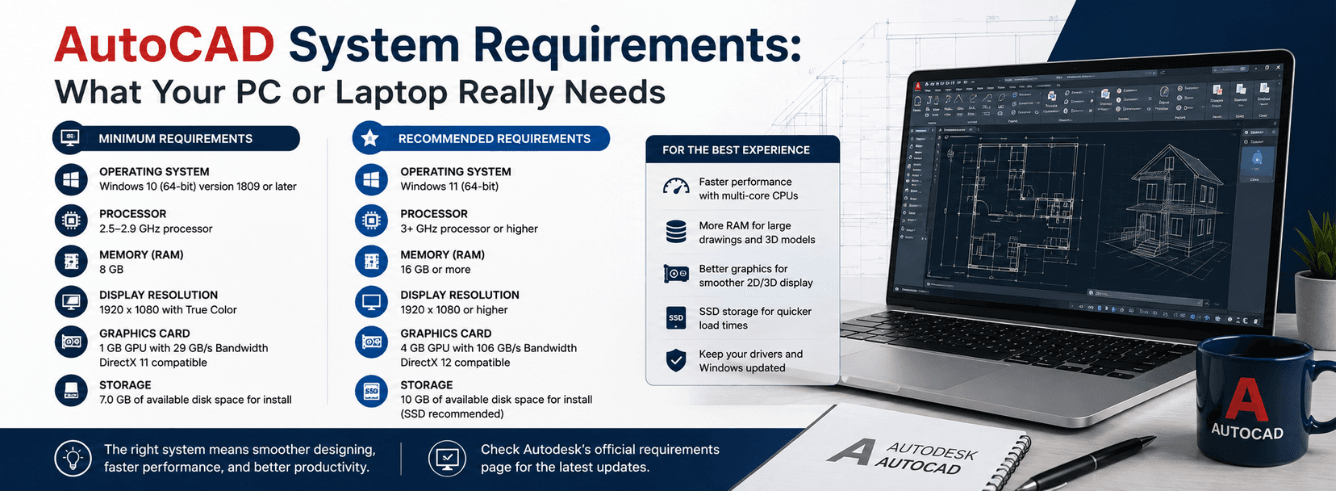
AutoCAD system requirements look simple on paper — but the official spec sheet tells only half the story. Grab a machine that barely meets the minimum, and you’ll spend more time staring at a spinning wheel than actually drafting.
- Minimum specs are survival specs. 8 GB RAM and a 2.5 GHz CPU will launch AutoCAD. They won’t make it pleasant.
- RAM is the single best upgrade. 16 GB is the real floor for professional work; 32 GB handles 3D and large sheet sets without swapping.
- AutoCAD loves single-core speed. More cores help with rendering and 3D navigation, but raw clock speed rules 2D drafting.
- Gaming GPUs work fine. You don’t need a Quadro or Radeon Pro unless you also run SolidWorks or Revit day-to-day.
- Apple Silicon runs AutoCAD natively. No Rosetta, no Parallels — the Mac version is a proper Metal-native build.
Why the official spec sheet misleads people
Autodesk publishes two tiers — “minimum” and “recommended” — and the gap between them is a canyon. The minimum exists so Autodesk can say AutoCAD runs on modest hardware. It does, technically. But “runs” and “runs well” are different things.
Here’s what the spec sheet doesn’t tell you:
- Minimum RAM gets consumed by Windows alone. Windows 11 idles at 3–4 GB. Add AutoCAD (1.5–2 GB at launch), a browser with 8 tabs of reference PDFs, and Outlook — you’ve already blown past 8 GB before opening a drawing.
- 2D vs 3D isn’t a footnote. The published specs are one-size-fits-all. A 2D drafter working with floor plans and a 3D modeler navigating a mechanical assembly have wildly different hardware needs.
- File size changes everything. A 500 KB architectural detail block demands nothing. A 45 MB site plan with xrefs, hatches, and annotation scaling will test your machine. The spec sheet doesn’t mention file complexity at all.
- Display resolution isn’t optional. Running AutoCAD on a 1366×768 laptop screen — still sold today — is a miserable experience. The ribbon alone eats 20% of your vertical space.
Our take: use the official AutoCAD system requirements as a bouncer at the door. If your PC can’t clear the minimum, stop. But if you want a machine that won’t annoy you daily, aim well above the recommended line — especially on RAM and storage speed.
AutoCAD 2026 requirements at a glance
Here’s the official breakdown for the current release, plus a third column we added — Zoftis Real-World Recommendation — based on what actual users need in daily practice.
| Component | Autodesk Minimum | Autodesk Recommended | Zoftis Real-World |
|---|---|---|---|
| Operating System | Windows 10 (22H2) 64-bit | Windows 11 (22H2+) 64-bit | Windows 11 64-bit |
| Processor | 2.5–2.9 GHz | 3+ GHz | 3.5+ GHz base clock (Intel i5/i7 13th-gen or later, AMD Ryzen 7000 series or later) |
| RAM | 8 GB | 16 GB | 16 GB minimum for 2D; 32 GB for 3D or large projects |
| GPU / VRAM | 1 GB VRAM, DirectX 12 (FL 12_0) | 4 GB VRAM, DirectX 12 | 4 GB VRAM minimum; NVIDIA RTX 3050/4060 or AMD RX 7600-class for 3D |
| Display Resolution | 1920×1080 | 1920×1080–3840×2160 | 1920×1080 minimum on a 15.6″ screen; 2560×1440 or 4K on 27″ desktop monitors |
| Storage | 10 GB free (HDD) | 10 GB free (SSD suggested) | NVMe SSD, 512 GB minimum (drawing + OS + scratch space) |
| DirectX | DirectX 12 (Feature Level 12_0) | DirectX 12 | DirectX 12 — older GPUs without FL 12_0 won’t launch 2026 |
DirectX 12 is a hard gate. If your GPU is from 2015 or earlier, AutoCAD 2026 won’t start. Don’t try to run this on a refurbished office PC with integrated graphics from the Windows 8 era — you’ll hit a wall immediately.
What you need based on what you actually do
AutoCAD means very different things to different people. A kitchen designer, a structural engineer, and a plant layout specialist all claim to “use AutoCAD” — but their machines shouldn’t be identical. Here are three real scenarios with specific autocad hardware requirements mapped to each one.
Scenario A: The 2D-only drafter (architectural plans, shop drawings, schematics)
- Processor: Intel Core i5-13500H or AMD Ryzen 5 7640HS — any modern 4+ core mobile or desktop chip with a 3.5 GHz+ turbo. AutoCAD’s 2D engine is lightly threaded, so single-core speed wins.
- RAM: 16 GB. This covers AutoCAD plus a PDF viewer, email, and a browser for looking up product specs.
- GPU: Integrated graphics on recent Intel (Iris Xe) or AMD (Radeon 680M/760M) actually work for pure 2D. A discrete GPU with 4 GB VRAM adds smoothness for zoom/pan on complex files. NVIDIA RTX 3050 is overkill but future-proof.
- Storage: 512 GB NVMe. Drawings are small, but you’ll want Windows and AutoCAD to load fast.
- Example machines: Dell Inspiron 16 Plus, Lenovo ThinkPad E16 (AMD), any midrange desktop with an i5-14400.
Scenario B: The 3D user (mechanical assemblies, walkthroughs, visual styles)
- Processor: Intel Core i7-13700H or AMD Ryzen 7 7840HS — 3D orbit and render previews benefit from extra cores, and you’ll notice the difference.
- RAM: 32 GB. 3D models chew through memory fast. Windows, AutoCAD, and a single medium-complexity 3D assembly can push past 20 GB combined.
- GPU: A discrete NVIDIA GeForce RTX 4060 (8 GB VRAM) or AMD Radeon RX 7600 XT. AutoCAD uses DirectX for 3D visual styles, and more VRAM prevents texture-swap stutter when you orbit a shaded model.
- Storage: 1 TB NVMe. 3D project files and linked assets balloon storage needs.
- Example machines: Lenovo Legion Pro 5, ASUS ProArt Studiobook, a custom desktop with an RTX 4070.
Scenario C: The student or hobbyist (learning AutoCAD on a budget)
- Processor: Intel Core i3-1215U or AMD Ryzen 3 7330U — enough for tutorials and small 2D drawings. Don’t expect fast 3D.
- RAM: 16 GB — don’t settle for 8 GB. A $40 RAM stick turns a frustrating laptop into a usable one. This is the single best advice for students.
- GPU: Integrated is acceptable for learning 2D. Look for Intel Iris Xe or AMD Radeon 660M — avoid older Intel UHD 620-class GPUs.
- Storage: 256 GB NVMe minimum. Cloud storage (OneDrive, Google Drive) can supplement.
- Example machines: Acer Aspire 5, used ThinkPad T14 Gen 3 (AMD), any refurbished business laptop with a recent CPU.
If you only remember one thing: RAM is cheap and transformatively effective. Upgrading from 8 GB to 16 GB is the highest-impact hardware change you can make for AutoCAD, full stop. Do that before you spend on a faster CPU or a dedicated GPU.
Processor: single-core speed beats core count
AutoCAD has a reputation for being a single-threaded dinosaur, and in 2026, that’s only partially true. Most 2D drafting commands — LINE, TRIM, OFFSET, HATCH — run on one core. Regenerating a drawing, refreshing viewports, and panning/zooming all depend on one fast core.
Where extra cores actually help
- Rendering and visual styles. Shaded, realistic, and ray-traced visual styles distribute work across multiple cores.
- File loading and regeneration. AutoCAD 2024 introduced multi-core drawing regeneration — large files now use available cores during REGEN.
- Background tasks. Autosave, audit, and publish operations run on background threads.
- 3D orbit and navigation. Rotating a shaded 3D model engages the GPU, but the CPU feeds it draw calls across multiple threads.
For 2D AutoCAD users, a 3.5 GHz quad-core i5 will feel faster than a 2.8 GHz 16-core workstation chip. Clock speed is king, and it’s not close.
Intel vs AMD for AutoCAD in 2026
Both are excellent. Intel’s 13th- and 14th-gen mobile chips (Raptor Lake) offer strong single-thread performance and good integrated graphics for 2D work. AMD’s Ryzen 7000 and 8000 series match or beat Intel in multi-threaded workloads while running cooler — important in a laptop. For desktop builds, pick whichever gives you more GHz per dollar at the time of purchase. The Intel-versus-AMD debate doesn’t have a clear AutoCAD winner in 2026.
Avoid ARM-based Windows laptops for AutoCAD. Qualcomm Snapdragon X Elite machines (Surface Pro 11, Galaxy Book4 Edge) run Windows on ARM. AutoCAD 2026 does not support ARM natively on Windows, and x86 emulation introduces performance and stability headaches. Stick to x86-64 processors from Intel or AMD.
GPU & VRAM: what AutoCAD actually demands
AutoCAD is not a GPU-intensive application in 2D mode. A $200 entry-level discrete card will keep up. Where people overspend is buying a $2,000 NVIDIA RTX 6000 Ada workstation GPU for an application that can’t use half its features.
Gaming GPUs vs workstation GPUs for AutoCAD
This question comes up constantly, so let’s settle it. Workstation GPUs — NVIDIA RTX A-series, formerly Quadro — exist primarily for certified ISV drivers in applications like SolidWorks, CATIA, and Siemens NX. Those applications validate specific driver versions and GPU architectures. AutoCAD does not require ISV-certified drivers. A GeForce RTX 4060 works identically to an RTX A2000 in AutoCAD, and costs half as much.
The only reason to buy a workstation GPU for an AutoCAD machine is if you also run Revit, 3ds Max, SolidWorks, or another application that benefits from certified drivers. For AutoCAD alone, save your money.
VRAM: the real bottleneck
VRAM matters most when you run multiple applications across dual monitors — AutoCAD on one screen, a 3D viewport active, plus a browser with a few dozen tabs on the other. Windows and applications share GPU memory. 4 GB is the practical minimum in 2026; 6 GB gives comfortable headroom; 8 GB is future-proof.
| GPU Class | VRAM | Best For |
|---|---|---|
| Integrated (Intel Iris Xe / AMD Radeon 680M) | Shared (system RAM) | 2D drafting only, light files, student work |
| Entry discrete (RTX 3050, RX 6500 XT) | 4–6 GB | 2D professional work, occasional 3D |
| Midrange discrete (RTX 4060, RX 7600 XT) | 8 GB | Daily 3D, large sheet sets, dual 4K displays |
| High-end discrete (RTX 4070 Ti+, RX 7900 XT) | 12–20 GB | Overkill for AutoCAD alone; useful for 3ds Max/Revit users |
Don’t buy a GPU that can’t do DirectX 12 Feature Level 12_0. NVIDIA GeForce 900 series and older, AMD Radeon R9 300 series and older, and Intel HD Graphics 5000 series and older will not launch AutoCAD 2026. Check your GPU against Microsoft’s DirectX Feature Level table before buying a used PC.
RAM: how much you’ll burn through in a real project
We’ve mentioned RAM across every section because it’s the component that most directly affects whether AutoCAD feels fast or frustrating. Here’s the concrete math on where your memory goes.
RAM consumption in practice (measured, not guessed)
| Application / Asset | Typical RAM Use |
|---|---|
| Windows 11 (clean boot, idle) | 3.2–4.0 GB |
| AutoCAD 2026 (launched, empty drawing) | 1.5–2.0 GB |
| Outlook + Chrome (5 tabs) | 1.5–2.5 GB |
| Adobe Acrobat (one 20-page PDF) | 0.5–0.8 GB |
| Small 2D drawing (200 KB — single floor plan) | +0.2–0.5 GB |
| Medium 2D drawing with xrefs (15 MB) | +1.5–3.0 GB |
| Large site plan with hatches & annotation (45 MB) | +4.0–7.0 GB |
| 3D mechanical assembly (100+ parts, shaded) | +6.0–12.0 GB |
Add the “Windows + AutoCAD + Outlook/Chrome” baseline (~7–9 GB) to your drawing’s RAM appetite. A large 2D site plan pushes the total past 14 GB. A 3D assembly lands beyond 19 GB. If you only have 16 GB, you’re into swap-file territory on 3D projects — and swapping to even the fastest NVMe drive is orders of magnitude slower than RAM.
For professional AutoCAD users, 16 GB is the floor, not the target. 32 GB is the honest recommendation for anyone billing by the hour.
AutoCAD for Mac & Apple Silicon requirements
The Mac version of AutoCAD is no longer a second-class port. Autodesk rebuilt it as a native Metal application with full Apple Silicon support, and it runs beautifully on M1, M2, M3, and M4 Macs. Here’s what you need to know about autocad laptop requirements for Mac users.
Official AutoCAD for Mac 2026 system requirements
- macOS: Ventura 13, Sonoma 14, or Sequoia 15
- Processor: Apple Silicon (M1/M2/M3/M4) natively supported; Intel Macs supported but not optimized
- RAM: 8 GB minimum, 16 GB recommended — note that Macs can’t be upgraded after purchase, so buy 16 GB or more upfront
- GPU: Apple Metal-capable GPU (every Apple Silicon Mac qualifies)
- Display: 1920×1080 minimum; Retina displays work natively
- Disk: 8 GB free space
Which Mac should you buy for AutoCAD?
The M3 and M4 MacBook Pro 14″ and 16″ models are outstanding AutoCAD machines. The M4 chip delivers single-core performance that rivals the fastest desktop CPUs — perfect for AutoCAD’s lightly-threaded 2D engine. Avoid the MacBook Air for professional AutoCAD work. The Air lacks active cooling, and after 15 minutes of sustained drafting with multiple viewports, it will thermal-throttle. It’s fine for students, but professionals should stick with the Pro.
The Mac mini (M4, 2024) paired with a 27″ 4K monitor is possibly the best value AutoCAD workstation on the market — $599 for the base model, plus a monitor, gets you a fast, quiet 2D drafting rig. Just spec 16 GB RAM at purchase; the base 8 GB model is too tight.
Intel Macs are fading. AutoCAD for Mac 2026 still runs on Intel Macs, but the experience is noticeably slower, and future versions are likely to drop Intel support. If you’re on a 2019 Intel MacBook Pro, plan your upgrade path now. A Zoftis AutoCAD for Mac license transfers to your new Mac without issue — the subscription follows your Autodesk account, not the hardware.
Laptop buying guide for AutoCAD
Not all laptops marketed as “powerful” are good AutoCAD machines. A thin-and-light ultrabook with a high-end CPU but no cooling headroom will throttle to base clock within minutes. Here’s what to look for when shopping for autocad laptop requirements specifically.
Five non-negotiable criteria for an AutoCAD laptop
- 100% sRGB display coverage. You’ll stare at this screen for hours. A dim, washed-out 45% NTSC panel — still common on $600 laptops — is unacceptable. Look for at least 300 nits brightness and 100% sRGB in the specs.
- 1920×1080 minimum resolution on a 15.6″ screen. 1366×768 panels still exist in the budget aisle and will make the AutoCAD ribbon feel claustrophobic. 1920×1200 (16:10 aspect ratio) is better for drafting — more vertical space for the drawing area.
- Upgradeable RAM, or buy enough upfront. Many thin laptops now have soldered RAM. If you buy an 8 GB model with soldered memory, you’re stuck with 8 GB forever. Either get a laptop with SODIMM slots (ThinkPad P-series, Dell Precision, Framework) or spec 16–32 GB at purchase.
- USB-C charging with Power Delivery. Carrying a proprietary 200 W brick is miserable. A laptop that charges over USB-C PD (65–100 W) can share a charger with your phone and accessories.
- A numeric keypad or a plan for an external one. AutoCAD power users rely on the numpad for coordinate entry. Many 14″ and 15″ laptops omit it. Budget for a $25 USB numpad if your laptop doesn’t include one.
Laptops that get it right (current generation, August 2026)
| Model | Best For | Key Specs to Look For |
|---|---|---|
| Lenovo ThinkPad P16s Gen 3 (AMD) | 2D professional, ISV-certified | Ryzen 7 PRO 8840U, 32 GB DDR5, 100% sRGB, numpad |
| Dell Precision 3591 | 2D/3D mobile workstation | Core Ultra 7 155H, RTX 500 Ada, 32 GB, 4K display option |
| ASUS ProArt P16 | 3D creative work, great display | Ryzen AI 9 HX 370, RTX 4070, 64 GB, 4K OLED 100% DCI-P3 |
| MacBook Pro 14″ (M4 Pro) | macOS-only AutoCAD users | M4 Pro, 24 GB unified memory, Liquid Retina XDR |
| Framework Laptop 16 | Upgradeable, repairable | Ryzen 7 7840HS, user-upgradeable GPU and RAM, 2560×1600 |
Consider a refurbished mobile workstation. One- or two-year-old Dell Precision and Lenovo ThinkPad P-series laptops with 32 GB RAM and a workstation GPU often sell for 40–50% off their original price. AutoCAD doesn’t need bleeding-edge hardware — a Precision 3581 from 2024 handles 2D work effortlessly for years. Spend the savings on a good external monitor.
Frequently asked questions
Can I run AutoCAD on a laptop with integrated graphics?
Yes, for 2D drafting. Intel Iris Xe (12th-gen and later) and AMD Radeon 680M/760M integrated graphics handle 2D line work, annotation, and viewport navigation without issues on small to medium files. For 3D visual styles — shaded, realistic, or ray-traced — you will notice stuttering and will want a discrete GPU with at least 4 GB of dedicated VRAM. Student work and practice files are fine on integrated graphics; paid professional 3D work is not.
Does AutoCAD 2026 support Windows 10, or do I need Windows 11?
AutoCAD 2026 officially supports Windows 10 64-bit (version 22H2) and Windows 11 64-bit (version 22H2 or later). However, Windows 10 reaches end of support in October 2025. If you’re building a new PC or buying a laptop today, install Windows 11. Continuing with Windows 10 means running AutoCAD on an operating system that no longer receives security patches — a risk not worth taking on a machine that likely handles client files.
How much VRAM do I really need for AutoCAD?
4 GB is the practical minimum for professional 2D work with dual monitors. 6 GB gives comfortable headroom. 8 GB or more is only necessary if you work in 3D visual styles daily or run multiple GPU-accelerated applications simultaneously. AutoCAD’s GPU memory usage alone rarely exceeds 2–3 GB — but your display compositor, browser, and any other open applications share the same VRAM pool. 4 GB covers AutoCAD plus a healthy multitasking load.
Is 8 GB RAM enough for AutoCAD in 2026?
On paper, yes — Autodesk lists 8 GB as the minimum. In practice, no. Windows 11, AutoCAD, and one or two companion applications will consume the full 8 GB before you open a medium-sized drawing. At that point, Windows begins swapping to your SSD, and every command — pan, zoom, trim, hatch — develops a micro-pause. Those pauses accumulate into frustration. If your current machine has 8 GB and no open RAM slot, it’s time to upgrade. If you’re buying new, 16 GB is the minimum for a professional user; 32 GB is our recommendation.
Can AutoCAD run on an M1/M2/M3/M4 Mac without Parallels?
Yes, natively. AutoCAD for Mac 2026 is a Universal binary that runs directly on Apple Silicon without Rosetta translation and without any Windows virtualization layer like Parallels or VMware. It’s a genuine macOS application built on Apple’s Metal graphics framework. You download it from your Autodesk account, install it, and it runs like any other Mac app. Performance on M3 and M4 Macs is excellent — often smoother than equivalently priced Windows laptops for 2D work.
Do I need a Quadro or Radeon Pro for AutoCAD?
No. AutoCAD does not require ISV-certified drivers. A consumer GeForce RTX or Radeon RX card works identically to a workstation GPU in AutoCAD. The only reason to buy a workstation GPU is if you also run SolidWorks, CATIA, Siemens NX, or another CAD application that validates specific driver versions. For a pure AutoCAD machine, buy a gaming GPU and put the savings toward more RAM or a better monitor.
What’s the cheapest PC that can run AutoCAD acceptably?
A refurbished business desktop with an Intel i5-12400 or AMD Ryzen 5 5600G, 16 GB DDR4 RAM, and a 512 GB NVMe SSD will handle 2D AutoCAD work comfortably. These machines sell for $300–$400 on the used market. Add a 24″ 1080p IPS monitor ($100) and you have a complete drafting station for under $500. The key is avoiding old GPUs — make sure the machine’s graphics (integrated or discrete) support DirectX 12 Feature Level 12_0. Intel UHD 730 and AMD Radeon Vega integrated graphics from the last 3–4 years qualify; older Intel HD Graphics 630 do not.
Get a genuine AutoCAD license at 40% off the Autodesk store price
AutoCAD 2024–2026 for Windows — $59/year (was $99). Delivered by email in 1–12 hours. 30-day money-back guarantee. Activates on your own Autodesk account — no shared credentials, no grey-market keys.
Buy AutoCAD for Windows — $59On a Mac? We also stock AutoCAD for Mac with native Apple Silicon support — $59/year.