
Blog
AutoCAD LT vs AutoCAD: Which Do You Actually Need?

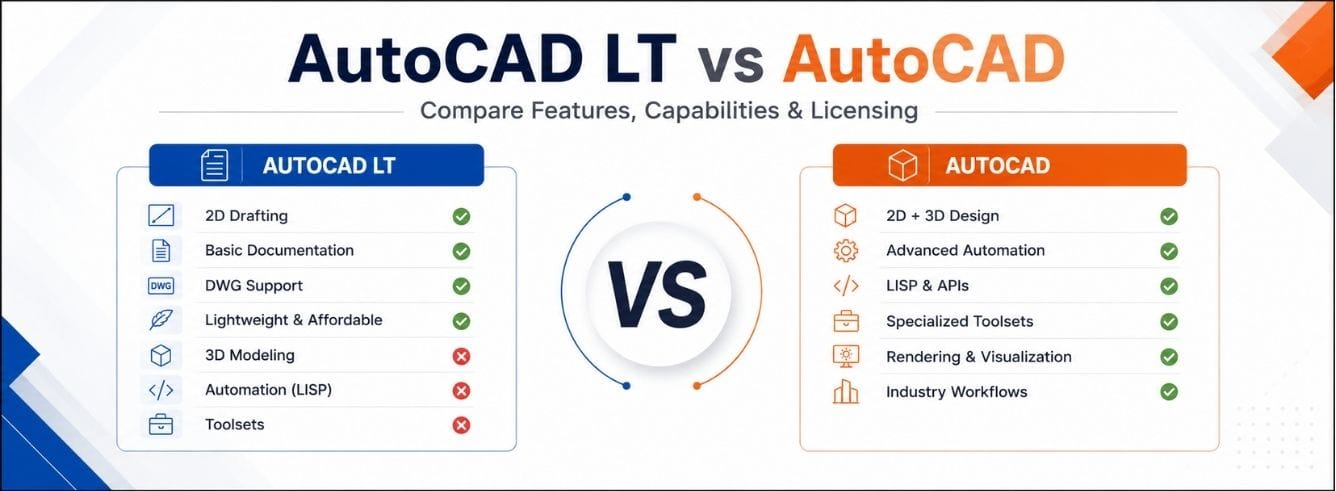
The honest version of autocad lt vs autocad is short: if you never build 3D geometry, never run custom plugins, and never touch an industry toolset, the cheaper product does everything you need — and you keep the price difference.
The real difference isn’t 2D — it’s everything past 2D
Both programs open the same DWG files and draw the same lines, layers, and layouts. On a routine 2D drawing they feel almost identical.
What only full AutoCAD adds
- Native 3D solids, surfaces, and mesh modelling
- Rendering and visualisation
- A deep automation and API layer (.NET, ObjectARX, Visual LISP)
- Seven industry-specific toolsets
The framing that saves money
So autocad lt vs autocad full isn’t “which is better.” It’s one question: does your work ever cross out of 2D — and if so, how often?
Autodesk’s own line: AutoCAD is every feature of LT plus 3D, automation, and toolsets. LT is the drafting core; full AutoCAD wraps that core in a bigger workflow. Never open the wrapper, and you’re paying for packaging.
AutoCAD vs AutoCAD LT comparison, side by side
Here’s the autocad vs autocad lt comparison most buyers actually need — capability first. Green marks the practical winner for a typical buyer, not a universal verdict.
| Capability | AutoCAD LT | Full AutoCAD |
|---|---|---|
| 2D drafting & documentation | Full professional toolset | Identical toolset |
| Native 3D modelling (solids, surfaces, mesh) | Not included | Full 3D environment |
| Rendering & visualisation | Not intended for it | Supported |
| AutoLISP automation | Supported in current releases | Supported, plus wider APIs |
| .NET / ObjectARX / advanced APIs | Limited | Full development access |
| Industry toolsets (Architecture, Electrical, Mechanical, MEP, Map 3D, Plant 3D, Raster) | None | All seven, eligible subscriptions |
| DWG compatibility | Yes | Yes |
| Web & mobile access | Included | Included |
| Autodesk list price (annual) | ~$500 / year | ~$1,865 / year |
The money-saving read is the second one: count how many of those extra rows your job actually touches. For many people doing auto cad lt vs autocad research, it’s the top row and the last three — nothing else.
What LT keeps (the tools you’ll use daily)
- Layers, blocks, dynamic blocks, and block libraries
- Dimensions, leaders, tables, fields, hatches, and annotation
- Paper-space layouts, scaled viewports, and plotting
- External references, DWG compare, and PDF/DGN import-export
- Sheet sets, Trace, Count, and drawing-sharing tools
What is AutoCAD LT vs AutoCAD on price, really
The list prices
On autocad lt vs autocad price, Autodesk’s public rates are clear. Full AutoCAD costs three to four times more, every year you subscribe.
| Plan | AutoCAD LT | Full AutoCAD |
|---|---|---|
| Annual (Autodesk list) | ~$500 / year | ~$1,865 / year |
| Monthly (Autodesk list) | Lower monthly rate | ~$235 / month |
| Through Zoftis (genuine seat) | From $399 / year | From $59 (Windows listing) |
The perpetual licence is gone. Autodesk no longer sells buy-it-once AutoCAD or LT. New licences are subscription (monthly, 1-year, 3-year) plus token-based Flex. Treat any brand-new “lifetime AutoCAD” claim with suspicion.
Where a reseller changes the maths
Zoftis lists a genuine single-user AutoCAD LT 2027 commercial subscription from $399/year, activated on your own Autodesk account — under Autodesk’s list rate for the same entitlement.
If your work does cross into 3D or toolsets, the full platform is on the AutoCAD for Windows listing. Keys arrive by email within 1–12 hours with a 30-day refund window.
The real cost mistake isn’t picking the cheaper product — it’s picking the dearer one for a feature you’ll use twice a year. If a toolset saves you hours weekly, full AutoCAD pays for itself. If not, that ~$1,300 gap is simply gone.
The AutoLISP myth that still steers people wrong
For years the web repeated one rule: “LT can’t run AutoLISP.” It was true once — and it quietly stopped being true.
What’s true now
- Current AutoCAD LT releases do support AutoLISP
- LT can load compatible routines and automate many drafting tasks
- If you rejected LT purely on this basis, the ground has moved
The caveat that still favours full AutoCAD
- Full AutoCAD owns the deeper stack: Visual LISP, .NET, ObjectARX, COM automation
- Most third-party plugins depend on that stack, not on LISP alone
- A custom .NET add-in or ObjectARX app is a hard requirement for full AutoCAD
Quick test: list every plugin, LISP routine, and internal tool you can’t work without. All load in LT? Automation isn’t a reason to pay for full. Even one needs the full API? The decision is made for you.
Where full AutoCAD is genuinely worth it: the toolsets
The seven industry toolsets are the strongest single argument for full AutoCAD. They replace manual drafting with intelligent, aware objects.
How the toolsets map to common comparisons
| Your question | Toolset in play | Verdict |
|---|---|---|
| autocad lt vs autocad architecture | Architecture (walls, doors, building docs) | LT can’t substitute |
| autocad lt vs autocad electrical | Electrical (schematics, auto-reports) | LT can’t substitute |
| autocad lt vs autocad mechanical | Mechanical (standard part libraries) | LT can’t substitute |
Be aware: opening vs authoring
A DWG built with toolset objects still opens in LT — but intelligent objects may appear as proxy geometry you can view, not fully edit.
- Receiving such files occasionally → LT is fine
- Authoring or editing them → a full-AutoCAD job
How AutoCAD Web fits into the LT question
A common side question in the autocad web vs autocad lt debate: can the browser version replace a desktop licence? For most people, no.
What AutoCAD Web is (and isn’t)
- Bundled with both LT and full subscriptions — it rides along, it’s not either/or
- Built for markups and light 2D editing on the go
- Not built to produce a full sheet set
So on autocad lt vs autocad web: treat the browser app as a convenience layer over your desktop seat. Serious drafting still happens on the desktop.
Version years: 2024 vs 2025 vs 2026
Two separate questions, often tangled
- autocad lt 2025 vs autocad 2025 → same split: LT 2D, full adds 3D + toolsets
- autocad 2024 vs autocad lt 2024 → same split again
- The year changes features at the margin, not the core distinction
Why the year usually isn’t a purchase decision
- A current subscription installs the three latest releases: 2026, 2025, 2024
- So autocad lt 2025 vs 2026 or autocad lt 2024 vs 2025 → run whichever a project needs
- Recent LT updates added smarter block tools and multi-user markup — refinements, not redefinitions
Watch older-version offers. An autocad lt vs autocad 2021 deal may be an old perpetual seat with no update path — fine if you need that exact version, a dead end if you expect ongoing releases.
AutoCAD LT vs the cheaper rivals
Most an autocad vs lt comparison guide stops at Autodesk’s own two products. But LT has real competitors underneath it on price — worth knowing before you commit.
| Product | Positioning vs AutoCAD LT | Trade-off to weigh |
|---|---|---|
| DraftSight | Lower-cost 2D DWG drafting; the classic budget swap | DraftSight Professional narrows the gap; LT still wins on Autodesk-workflow fidelity |
| BricsCAD | bricscad lite vs autocad lt targets LT directly; Pro even adds 3D | A genuine 2026 contender — friction is retraining and plugin compatibility |
| SketchUp | Conceptual 3D massing; a sketchup vs autocad lt comparison is apples-to-oranges | Great for early 3D ideas, weak for precise 2D construction docs |
| TurboCAD | Perpetual-licence CAD; turbocad vs autocad lt appeals to buy-once holdouts | One-time cost is nice; DWG round-tripping and familiarity favour LT |
The pattern across every thread
Whether it’s a draftsight professional vs autocad lt or bricscad vs autocad lt comparison 2025 2026 thread, the rivals compete on price and often match LT on 2D — but LT wins on ecosystem: DWG fidelity and clean fit alongside other Autodesk software.
One Autodesk-family curveball: autocad lt vs revit lt. Revit LT is a BIM tool, not a drafting one — which is exactly why the autocad revit lt suite vs revit bundle exists. That’s a “both,” not an “either/or.”
A five-question decision you can answer in a minute
Skip the spec sheets. These resolve the autodesk autocad lt vs autocad choice faster than any feature list:
- Do you create new 3D geometry, or only view it? Create → full. View → LT.
- Does any must-have plugin require the full API? Yes → full. No → LT clears it.
- Would a toolset save you hours weekly? Yes → full. No → LT.
- Are deliverables essentially 2D plans and documentation? Yes → LT covers it.
- Is the ~$1,300/year gap better spent elsewhere? If nothing above forced full → LT, keep the difference.
If your answers land mostly on the 2D side, don’t let “future-proofing” talk you into the expensive seat — a standard DWG moves up to full AutoCAD any time.
Who should buy AutoCAD LT
- Architectural technicians producing floor plans, sections, and details
- Contractors and sub-trades marking up and updating construction drawings
- Draughtspeople whose deliverables are 2D sheets, schedules, and documentation
- Small firms that share drawings as DWG or PDF and never model in 3D
Who should buy full AutoCAD
- Designers who create and edit 3D solids, surfaces, or meshes as core work
- Teams running custom .NET, ObjectARX, or heavy LISP automation
- Disciplines that live inside a toolset — Architecture, Electrical, Mechanical, MEP, Plant 3D
- Offices that must author (not just open) intelligent toolset objects
Frequently asked questions
Is AutoCAD LT just a cut-down, non-professional AutoCAD?
No. It’s a full professional 2D CAD application used in real architecture, engineering, and manufacturing offices. Its limit is scope — no native 3D creation, no toolsets — not drafting accuracy.
Can AutoCAD LT open files made in full AutoCAD?
Yes — both use DWG, so standard drawings move cleanly. The exception is files with specialised toolset objects, which LT may show as proxy objects you can view but only edit in a limited way.
Does AutoCAD LT support AutoLISP now?
Yes — current LT releases support AutoLISP, reversing the old rule. Full AutoCAD still offers the wider environment (.NET, ObjectARX, Visual LISP), so verify your specific routines against LT first.
How much cheaper is AutoCAD LT than full AutoCAD?
At Autodesk list pricing, LT is roughly $500/year versus about $1,865/year for full — three to four times less. Through Zoftis, a genuine LT commercial subscription starts from $399/year.
Is there still a one-time perpetual AutoCAD licence?
Not for new purchases. Autodesk sells AutoCAD and LT by subscription only (monthly, 1-year, 3-year), plus token-based Flex for occasional use.
Should I compare AutoCAD LT against DraftSight or BricsCAD instead?
Worth a look if budget is your main driver. DraftSight and BricsCAD Lite compete on 2D at a lower price, and BricsCAD Pro adds 3D. LT’s edge is ecosystem — DWG fidelity and fit alongside other Autodesk software.
Which version year should I buy — 2024, 2025, or 2026?
A current subscription installs the three latest releases (2026, 2025, 2024), so you usually don’t have to choose. The LT-versus-full distinction is the same in every year.
Ready to buy the right seat?
2D work? Get a genuine AutoCAD LT 2027 commercial subscription from $399/year — your own Autodesk account, emailed within 1–12 hours, 30-day refund.
View AutoCAD LT pricing at Zoftis →Need the full 3D platform and toolsets? See genuine AutoCAD for Windows.